Hi, we'reJustin & Liana
We try the new AI tools first and show you what actually works. Every prompt and guide from our videos is right here. Free, no email.
Work with us
Free vault
Free. Tap one to open it. Everything is right here on the page.
Same one we DM when you comment CAMERA.
Step 1: turn a photo of each person into a 3D animated character sheet, then give each one an outfit. Do it once for each of you.
Step 2: make the place, the tiny workshop inside the phone.
Step 3: give the two outfit sheets and the place to Seedance 2.5 with the video prompt. We made it 20 seconds, 16:9, with sound on, in one go. We also added a 12-second clip of each voice so the lines sound like us. Every line of dialogue is written in the prompt, with who says it.
We made the pictures with Nano Banana 2.1. The video took one try.
Create a character sheet for a modern 3D animated feature film: the person from image 1, turned into a stylised 3D animated film character (soft rounded forms, a slightly larger head, expressive eyes), still clearly recognisable as the person in image 1. They wear a fitted plain grey tank top, plain grey shorts and are barefoot. No logos. Layout: a seven-panel grid on a matte light-grey studio background. Top row: four full-body views (front, three-quarter left, side profile, back), standing relaxed. In every full-body view the face is softly blurred, so the face reads only in the close-ups. Bottom row: three sharp head-and-shoulders close-ups: front with a friendly smile showing a little of the teeth, three-quarter with a laugh, and a curious side glance. Soft, even studio light, gentle ground shadows. Clean, consistent design across all panels. No text, no labels, no captions, no arrows, no logos, no watermark.
Edit the character sheet in image 1: keep the same person, the same seven-panel layout, the same views, poses, face, hair, body, proportions, animation style, background and light. Change only the clothes. New outfit: [your outfit, for example a cosy mustard-yellow chunky-knit crew-neck sweater, mid-blue straight jeans and clean white low-top canvas sneakers]. In the four full-body views of the top row the face stays softly blurred, as in image 1. The three close-ups on the bottom row stay sharp and show the neckline. No text, no labels, no logos, no watermark.
Create one wide establishing frame from a modern 3D animated feature film: the secret tiny workshop inside a smartphone, seen at the scale of a person a few centimetres tall. No people, no characters. The space is a cosy, warm world built from real phone parts. The floor is a deep green circuit board with copper traces running like little streets. Black microchips stand like small buildings with tiny glowing windows. At the top left, a huge round camera lens forms a glass skylight in the ceiling; a soft golden beam of daylight falls through it onto an open work area in the middle of the floor. On the right, a tall wall of soft glowing pixel tiles in many colours, like a giant blank canvas, with a wooden ladder leaning against it. In the middle ground: a big copper crank lever on a stand, a few tin paint buckets with glowing light inside, a small rolling cart with brushes and rollers, and coiled ribbon cables like garden hoses. A glowing glass tube runs from the work area up through the ceiling toward the screen. Battery cells stand at the back like big warm-lit tanks. Warm golden light from the lens skylight, cool blue glow from the chips, soft haze in the beam. Rich foreground, midground and background depth, with open floor space in the middle where characters can work. Clean, warm, magical. No text, no labels, no brand names, no logos, no watermark.
@Image 1 is the man: the man with wavy light brown hair, a full moustache, stubble and thin round gold wire glasses, in an off-white t-shirt, light blue jeans and white sneakers. His face, hair, glasses and clothes come only from @Image 1. @Image 2 is the woman: the woman with long wavy honey-brown hair, warm light-tan skin and a small beauty mark under her right eye, in a mustard-yellow chunky-knit sweater, blue jeans and white sneakers. Her face, hair and clothes come only from @Image 2. @Image 3 is the location of Shots 3 to 5: exactly this secret tiny workshop inside a smartphone, with the circuit-board floor, the chip buildings, the round lens skylight, the copper crank lever, the paint buckets of glowing light, the glass tube and the glowing pixel wall. @Audio 1 is the voice of the man from @Image 1. @Audio 2 is the voice of the woman from @Image 2. Take only the voice, accent and way of speaking from them, never their words. The man: a relaxed, friendly man in his mid-thirties with a light Australian accent, warm and easy, gets excited and a bit proud when something works. The woman: a warm, playful woman around thirty, bright and clear, teasing and quick to laugh. A short story from a modern 3D animated family film. Inside the phone, the man and the woman appear again as tiny versions of themselves, a few centimetres tall, with the same faces and the same clothes. Inside, the microchips tower over them like buildings, the paint buckets reach their knees and the lens skylight is many times wider than they are tall. Shot 1, 00:00-00:03. Golden hour in a sunny park, a big tree and warm sunlight behind them. A medium shot from the front: the woman leans in close to the man, who holds a smartphone up at arm's length for a selfie. The woman grins: "Okay, say cheese!" Both together: "Cheese!" His thumb taps the shutter button on the screen. Shot 2, 00:03-00:05. Extreme close-up of the small front camera lens at the top of the phone screen. The camera pushes straight into the dark glass; a ring of warm light opens and swallows the frame. Shot 3, 00:05-00:09. Inside the phone: a wide shot of the tiny workshop. A golden beam of light shoots down through the lens skylight. The tiny man runs under it with a big butterfly net and catches the glowing ball of light, staggering back from its weight. The tiny man: "Got it!" Shot 4, 00:09-00:13. The tiny man tips the light into a tin paint bucket, and it glows. The tiny woman grabs the bucket, climbs the ladder at the pixel wall and rolls the glowing paint across it with a paint roller; the pixels light up in warm colours and form the selfie of the two of them. A close shot of her proud smile, paint on her cheek. Shot 5, 00:13-00:16. The tiny woman jumps down. The tiny man and the tiny woman pull the big copper crank lever together; the finished picture shrinks into a glowing card and zips up the glass tube toward the ceiling with a whoosh. Shot 6, 00:16-00:20. Back in the sunny park, a close two-shot over the phone: the selfie appears on the screen. The man and the woman look at it, then at each other, and laugh. The woman: "Aww, that's cute." The man smiles, a little proud. Only the character who speaks moves their mouth. Sound: the two voices, a soft shutter click at the tap, a deep whoosh into the lens, a bright sparkle when the light is caught, paint roller swishes, a clunk of the lever and a zip up the tube, birds and a light breeze in the park. Music: bouncy, whimsical pizzicato strings with glockenspiel and light woodwinds, playful and warm, like a family animated film, under the whole scene. Modern 3D animated feature film look: soft rounded characters, expressive eyes, warm global light, rich colour, gentle depth of field. Not photoreal, not 2D. No text, no captions, no logos, no brand names on the phone.
Same one we DM when you comment CANDID.
Open ChatGPT, type /image, then paste the first prompt. We ran that one twice, and both times it sent back the same girl in the same messy room.
The trick is asking for a bad photo on purpose: blurry, badly lit, face half out of frame. That's what makes it look like a real camera roll.
The other two are new versions: a flash mirror selfie, and one that turns your own photo into a candid. We haven't run them yet, so tell us what you get.
/image Take a photo of yourself as if you were a real person grabbing a quick selfie on an old phone. Don't pose and don't fix anything: slightly blurry from movement, harsh uneven light, part of your face out of frame, a tilted angle and a cluttered background. It should look like a shot nobody meant to keep.
/image Take a mirror selfie of yourself as if you were a real person in a small, messy bathroom, with the phone flash firing into the mirror. Don't pose and don't fix anything: a smudged mirror, flash glare covering part of your face, a crooked angle and stuff all over the counter. It should look like a photo you forgot you took.
/image [attach a photo of yourself] Turn this into a selfie I took by accident on an old phone. Keep my face exactly the same. Slightly blurry from movement, harsh uneven light, part of my face out of frame, a tilted angle and a cluttered background. It should look like a shot nobody meant to keep.
Same one we DM when you comment SPIN.
Paste the prompt into ChatGPT and swap 'white sneaker' for what you sell. You get one image with 8 frames of it turning.
Save that image as sheet.png next to your page, then paste the code where the product should spin. Each frame shows for 0.16 seconds.
Our sheet was 1536 x 1024, so one frame is 384 x 512. If yours is a different size, divide its width by 4 and its height by 2, and put those numbers in the code.
It's not perfect: the product can drift a little between frames, so watch the loop once before it goes live.
Create a single animation sprite sheet for a seamless looping GIF. 8 frames in a 4 by 2 grid of equal square cells, read left to right, top row first. Every cell shows the same white sneaker at the same size and position, centred on a plain light grey background with the same soft studio light. The sneaker turns 45 degrees to the right from one frame to the next, so frame 8 leads straight back into frame 1. The camera stays still. No text.
<div id="shoe"></div> <style> #shoe { width: 384px; /* one frame: sheet width / 4 */ height: 512px; /* one frame: sheet height / 2 */ background: url(sheet.png) no-repeat; } </style> <script> const shoe = document.getElementById('shoe'); let f = 0; setInterval(() => { shoe.style.backgroundPosition = -(f % 4) * 384 + 'px ' + -Math.floor(f / 4) * 512 + 'px'; f = (f + 1) % 8; }, 160); </script>
Same one we DM when you comment BRAND.
Five plugins, one job each: the voice, the designs, the assets, the website and the posts.
In Cowork, add them at claude.com/plugins. In Claude Code, paste the lines from the first box.
Canva, Adobe, B12 and Postiz each need your own account in that app. B12 edits your live site through Claude's browser access in Cowork.
Then paste the prompts in order and fill in the brackets.
claude plugin marketplace add anthropics/knowledge-work-plugins claude plugin install brand-voice@knowledge-work-plugins claude plugin install canva@knowledge-work-plugins claude plugin install adobe-for-creativity@knowledge-work-plugins claude plugin install b12-claude-plugin@knowledge-work-plugins claude plugin install postiz@knowledge-work-plugins
I'm attaching [my About page, a few posts and emails]. Find my brand voice from them and write it up as clear guidelines with do and don't examples. Then check this caption against them and rewrite it: [caption].
Make an Instagram post in Canva for [my brand] announcing [news], in my brand colours [colours]. Then resize it for a story and a LinkedIn post, and brand-check all three.
Take these [number] product photos and adapt each one for an Instagram post, a story and a YouTube thumbnail. Keep the same look across all of them.
Build a website for my business with B12: [two or three lines on what you do, who it's for and where]. Then change the main heading to [new heading].
Schedule these three posts with Postiz for next week, one a day at 12:00, on Instagram, TikTok and X: [post 1], [post 2], [post 3].
Same one we DM when you comment TV.
It's Gathin's free repo, cleanyourtv (MIT). You paste one prompt into Claude Code or another coding assistant, and it finds your TV on your Wi-Fi, switches off the ad and junk apps, and puts in a clean Apple TV style home screen.
On the TV first: Settings, Device Preferences, About, then press OK on Build 7 times. Go back to Developer options and turn on USB debugging (plus Network or ADB debugging if your TV shows it). Leave the TV on.
Then on your computer, on the same Wi-Fi as the TV: clone the repo, open the folder in your assistant, paste in PROMPT.md and fill in your TV model. The repo says it takes about fifteen minutes.
Nothing gets uninstalled. The apps are only switched off, so the undo line below turns everything back on.
Android TV and Google TV only. Samsung, LG, Roku, Vizio and Hisense VIDAA won't work, but the not-Android page below shows how to turn off their tracking with your remote. No laptop, just an Android phone? There's a community app for that.
We haven't run this one ourselves. It's the repo's own prompt, so read what it asks before you say yes.
git clone https://github.com/Gathin23/cleanyourtv
I want to debloat my Android TV and replace its launcher with a clean Apple TV style home screen. My TV model is: <MODEL NAME HERE>.
TV_HOST=192.168.1.50 tools/restore.sh examples/<your tv>/debloat.txt
Same one we DM when you comment DISCOUNT.
Step one finds the codes. Step two tests them. Most people stop after step one.
The first list is only codes people reported online. ChatGPT says so itself: they are not checkout-tested.
For step two, switch ChatGPT from Chat to Work at the top and tell it to use the browser (in the desktop app, pick @Browser). It goes to the store, tries each code at checkout, leaves the best one on and asks you before any payment.
Good to know: the Work browser needs a paid ChatGPT plan, not Free or Go. Some stores block automated browsers. Use a guest cart, and never let it confirm a payment for you.
I'm about to buy this: [paste the product link]. Find every working discount code, cashback offer and current sale for it. Tell me where each one comes from and which combination would be cheapest. Mark clearly which codes are only reported and which are confirmed.
Use the browser. Open [paste the product link], add it to the cart and go to checkout. Try each code from your list, one at a time, and note what each one does to the total. Leave the best working code applied. Stop before any payment and show me the final total.
Same one we DM when you comment COPY.
REA is a free, open-source repo (MIT). It lets your coding agent study how a feature works in an app, show you the evidence, and build your own version of it in your project. No source code needed.
Setup: install Node.js, then run the command below. Pick your agent (Claude Code, Codex, Cursor, Gemini CLI and others), review the changes, approve them, and restart your agent.
Then paste the prompt and fill in the brackets.
Websites need a Chrome-family browser. Native apps also need Hopper, Ghidra or IDA.
What we got: we pointed it at Excalidraw's hand-drawn lines. It pulled the live site's scripts. One analysis step timed out on the big bundle, so our agent read that code itself and found the trick: every line is drawn twice, each point gets nudged a little at random, and a saved seed keeps the wobble. Our own version, written from scratch, passed both of our checks.
The rules: you get your own version of the idea, not their code. Only use it on apps you own or are allowed to study.
npx rea-agents setup
Use REA to study how [the feature] works in [the app or website]. Use it the way a person would, explain how the feature works, and show me the evidence for each conclusion. Then build a similar version in my project, written from scratch: do not copy their code or assets. Add tests that prove it works.
Same one we DM when you comment VILLA.
Film one selfie take under 15 seconds, and put a finger snap in it.
Run both prompts as Wan 3.0 video edits of that take. Edit 1 swaps the place and the outfit. Edit 2 swaps only the outfit.
Write your own place and outfit in the brackets. Cut between the edits on your gestures, so the jumps feel like a trick.
Edit Video 1. One continuous shot without cuts, with exactly the same handheld arm's-length selfie framing, the same wobble and drift of the frame, and the same distance to his face as Video 1. Keep the man exactly as he is: his face, his hair, his skin. Keep the performance exactly the same: every movement, gesture, head turn, expression and mouth movement at the same moment from the first frame to the last, the thumb pointing back over his shoulder, the finger snap beside his face, the tug at the chest of his top, the point at the lens, and the same words at the same moments. Change two things. First, the place: [PLACE: he now sits on a cream outdoor lounge sofa on the terrace of a white modern luxury villa on the French Riviera. Behind him: a turquoise infinity pool with pale travertine edges, tall palm trees and cypress trees, a white villa wall with big glass windows, two red and black supercars parked by the pool, and the blue sea far below]. Bright late-afternoon Mediterranean sun, hard and warm, on his face from the same side as in Video 1. Second, his outfit: [OUTFIT: his grey sweatshirt becomes a cream sleeveless designer knit top, his round gold glasses become black designer sunglasses, his bead bracelet becomes a chunky gold watch on the same wrist, and a thin silver chain sits at his neck]. Everything else about him stays the same. Sound: his voice exactly as in Video 1, with soft outdoor terrace ambience. NO MUSIC, NO SCORE. No text, logos or captions anywhere.
Edit Video 1. One continuous shot without cuts, with exactly the same handheld arm's-length selfie framing, the same wobble and drift of the frame, and the same distance to his face as Video 1. Keep the man exactly as he is: his face, his hair, his skin. Keep the room exactly as it is, with the same light. Keep the performance exactly the same: every movement, gesture, head turn, expression and mouth movement at the same moment from the first frame to the last, the thumb pointing back over his shoulder, the finger snap beside his face, the tug at the chest of his top, the point at the lens, and the same words at the same moments. Change only his outfit: [OUTFIT: his grey sweatshirt becomes a cream sleeveless designer knit top, his round gold glasses become black designer sunglasses, his bead bracelet becomes a chunky gold watch on the same wrist, and a thin silver chain sits at his neck]. Everything else stays the same. Sound: his voice exactly as in Video 1, and the same quiet room tone. NO MUSIC, NO SCORE. No text, logos or captions anywhere.
Same one we DM when you comment INSIDE.
First make the six frames as images. Frame 2 is an edit of frame 1. Frames 3 to 6 use a picture of your two characters as image 1, so they look the same in every frame.
Then make the five clips. Each clip starts on one frame and ends on the next: clip 1 is frame 1 to frame 2, clip 2 is frame 2 to frame 3, and so on. That is why it plays as one story.
We made the frames with Nano Banana 2.1 and the clips with Wan 3.0, 5 seconds each, one try per clip. We muted the clips and added music and sound effects after.
A frame from a modern 3D animated feature film, 16:9. A cosy home kitchen on a sunny morning. On a warm wooden counter stands a charming retro espresso machine: rounded body in soft mint green with polished chrome trim, a round brass pressure gauge on the front, one big round brew button glowing soft amber, and right beside the button a small round brass-rimmed porthole window, dark glass with a faint warm glow behind it. One chrome spout over a chrome drip tray, and an empty white ceramic cup sits on the drip tray under the spout. Camera: medium shot at counter height, 35 mm, the machine fills the right two thirds of the frame, slightly angled. From the left edge a friendly adult cartoon hand in a blue knit sweater sleeve reaches toward the amber button, the index finger a few centimetres from it, not yet touching. Light: warm morning sun through a window on the left, soft long shadows, a plant and a jar of coffee beans softly out of focus in the background. Rich, warm colours, soft global illumination, clean stylised shapes. No people's faces in frame. No text, no brand names, no logos, no labels, no watermark.
The next frame of the same modern 3D animated feature film as image 1, 16:9. An extreme close-up on the front panel of the same mint-green espresso machine from image 1. The index finger in the blue knit sweater sleeve presses the round brew button fully in, and the button glows bright amber around the fingertip. Right of the button the round brass-rimmed porthole window now glows warm orange from inside, and through its glass we glimpse a warm, busy little workshop deep inside the machine: copper pipes, brass gears and two tiny human silhouettes far away. Camera: macro close-up, 85 mm, shallow depth of field, the button and the porthole both in frame, the porthole on the right third and sharp. Same warm morning sunlight as image 1, soft reflections on the chrome trim and the mint paint. No text, no brand names, no logos, no watermark.
A frame from the same modern 3D animated feature film as image 2, 16:9. We are inside the espresso machine from image 2: a cosy, warm workshop the size of a room for two tiny people, built from polished copper pipes, brass gears, rivets and mint-green painted metal walls, lit by warm orange work lamps and a soft glow of steam. The man from image 1 (glasses, moustache, brown leather apron) pushes a big wooden crank handle with both hands, turning a large brass coffee grinder. Real coffee beans tumble down a brass chute above him into the grinder; each bean is as big as his head. Fine ground coffee pours out of the grinder spout into a giant chrome espresso filter basket on the floor. The woman from image 1 (mustard scarf in her ponytail, cream apron) stands next to the basket with a wooden scoop, laughing, coffee dust in the air. Camera: wide shot at their eye level, 28 mm, both full body and clearly visible, faces lit and readable, the grinder in the centre, the basket right. Warm golden light, floating coffee dust catching the light, rich browns, copper and mint. No text, no brand names, no logos, no watermark.
The next frame of the same modern 3D animated feature film as image 2, 16:9, in the same workshop inside the espresso machine. The giant chrome filter basket from image 2 is now full of ground coffee. A huge round brass coffee tamper, as wide as the basket, sits on top of the coffee. The woman from image 1 (mustard scarf, cream apron) stands on top of the tamper with both feet, arms out, bouncing down on it with a big laugh to press the coffee flat. The man from image 1 (glasses, moustache, brown leather apron) stands beside the basket holding the tamper's tall wooden handle steady with both hands, grinning up at her. A small puff of coffee dust around the edge of the basket. Camera: medium wide shot, 35 mm, a little lower than their eye level, both full body and clearly visible, faces lit and readable. The brass grinder softly behind them on the left. Same warm lamp light and steam glow as image 2. No text, no brand names, no logos, no watermark.
The next frame of the same modern 3D animated feature film as image 2, 16:9, in another corner of the same workshop inside the espresso machine. A big round copper boiler with a brass pressure gauge hisses white steam from its valves. The man and the woman from image 1 (the same faces, glasses, aprons and clothes) hang together on a long brass lever with a red wooden grip, pulling it all the way down, feet off the floor, laughing. Under the boiler a thick stream of dark espresso with golden crema pours out of a brass nozzle into a polished copper slide that curves down and away into a round dark opening in the floor. Camera: medium wide shot, 28 mm, both full body and clearly visible, faces lit and readable, the boiler and lever on the left half, the coffee stream and copper slide on the right half. Warm lamp light, glowing steam, rich copper, brass and mint. No text, no brand names, no logos, no watermark.
A frame from the same modern 3D animated feature film as image 2, 16:9. Back outside in the sunny kitchen from image 2. A close shot of the drip tray of the same mint-green espresso machine. The white ceramic cup now stands full of fresh espresso with thick golden crema, a small heart shape drawn in the crema, a soft curl of steam rising. Beside the cup on the chrome drip tray stand the tiny man and woman from image 1 (the same faces, glasses, aprons and clothes), each about as tall as the cup, a few coffee smudges on their aprons. The man waves up at the camera with a proud grin, the woman leans on the cup's handle and gives a thumbs up, smiling. Camera: low close shot at drip-tray height, 50 mm, the cup and both tiny characters sharp, their faces lit and readable, the chrome spout just in frame at the top, the kitchen softly out of focus behind. Same warm morning sun. No text, no brand names, no logos, no watermark.
The video starts exactly on the first frame and ends exactly on the last frame, settling on it for the final half second with no drift. Shot 1 (0-5 s), one continuous take: in the sunny kitchen the hand in the blue knit sleeve presses the round amber brew button on the mint-green espresso machine; the button clicks in and glows brighter. As it is pressed the camera pushes in smoothly from the medium shot to a macro close-up of the front panel, and the brass porthole beside the button lights up warm orange from inside, showing tiny figures at work deep in the machine. Sounds: a soft button click, a low mechanical hum starting up, a faint rising whir. Style: a modern 3D animated feature film, warm and cosy, soft global illumination, the exact look, colours, characters and set of the two frames. The man has round gold glasses, a moustache and a brown leather apron; the woman has a mustard scarf in her ponytail and a cream apron; both keep their faces, hair and clothes from the frames in every moment. Sound: only realistic sound effects and room tone that match the action. NO MUSIC. No speech, no words, no singing; laughs and small happy sounds only where written. No text, no logos, no watermark.
The video starts exactly on the first frame and ends exactly on the last frame, settling on it for the final half second with no drift. Shot 1 (0-2.5 s): the camera keeps pushing forward into the glowing porthole, through the glass, and flies fast through a winding tunnel of polished copper pipes and turning brass gears lit by warm orange light. Shot 2 (2.5-5 s): the camera bursts out of the pipe into the cosy workshop inside the machine and slows into the wide shot of the last frame: the man pushes the big wooden crank of the brass grinder, coffee beans tumble down the chute into it, ground coffee pours from its spout into the giant chrome filter basket, and the woman stands by the basket with a wooden scoop, laughing. Sounds: a whoosh through the pipes, metal clanks and gear ticks, then grinding crunch and rattling beans. Style: a modern 3D animated feature film, warm and cosy, soft global illumination, the exact look, colours, characters and set of the two frames. The man has round gold glasses, a moustache and a brown leather apron; the woman has a mustard scarf in her ponytail and a cream apron; both keep their faces, hair and clothes from the frames in every moment. Sound: only realistic sound effects and room tone that match the action. NO MUSIC. No speech, no words, no singing; laughs and small happy sounds only where written. No text, no logos, no watermark.
The video starts exactly on the first frame and ends exactly on the last frame, settling on it for the final half second with no drift. Shot 1 (0-2 s), the wide shot of the first frame: the man turns the crank hard, beans crunch, ground coffee keeps pouring into the giant filter basket until it is full, the woman scoops the top flat and laughs. Hard cut. Shot 2 (2-5 s), the medium wide shot of the last frame: the huge round brass tamper sits on the coffee in the basket; the woman climbs onto it and bounces down on it with her arms out, laughing, while the man holds the tall wooden handle steady and grins up at her; a small puff of coffee dust blows out around the edge. Sounds: grinding crunch, then a soft thump with each bounce, her laugh, a puff of dust. Style: a modern 3D animated feature film, warm and cosy, soft global illumination, the exact look, colours, characters and set of the two frames. The man has round gold glasses, a moustache and a brown leather apron; the woman has a mustard scarf in her ponytail and a cream apron; both keep their faces, hair and clothes from the frames in every moment. Sound: only realistic sound effects and room tone that match the action. NO MUSIC. No speech, no words, no singing; laughs and small happy sounds only where written. No text, no logos, no watermark.
The video starts exactly on the first frame and ends exactly on the last frame, settling on it for the final half second with no drift. Shot 1 (0-1.5 s), the shot of the first frame: the woman bounces once more on the brass tamper, the man holds the handle, a puff of coffee dust. Hard cut. Shot 2 (1.5-5 s), the medium wide shot of the last frame, by the big copper boiler: the man and the woman run in, jump up, grab the long brass lever by its red grip together and pull it all the way down with their feet off the floor, laughing; white steam bursts from the boiler valves, the gauges jump, and a thick stream of dark espresso with golden crema gushes from the brass nozzle into the curving copper slide and runs down into the round dark opening in the floor. Sounds: a heavy metal clunk of the lever, a loud steam hiss, gurgling, pouring coffee, both laughing. Style: a modern 3D animated feature film, warm and cosy, soft global illumination, the exact look, colours, characters and set of the two frames. The man has round gold glasses, a moustache and a brown leather apron; the woman has a mustard scarf in her ponytail and a cream apron; both keep their faces, hair and clothes from the frames in every moment. Sound: only realistic sound effects and room tone that match the action. NO MUSIC. No speech, no words, no singing; laughs and small happy sounds only where written. No text, no logos, no watermark.
The video starts exactly on the first frame and ends exactly on the last frame, settling on it for the final half second with no drift. Shot 1 (0-2 s): the camera dives after the stream of espresso down the copper slide into the dark opening and rushes through a short pipe toward a bright light. Hard cut. Shot 2 (2-5 s), outside in the sunny kitchen, the low close shot of the last frame: the last drops of espresso fall from the chrome spout into the white cup, which is full with golden crema and a small heart in the crema, steam curling up; the tiny man and woman climb up onto the chrome drip tray beside the cup, the man waves up at the camera with a proud grin, the woman leans on the cup handle and gives a thumbs up. Sounds: a rushing whoosh through the pipe, a few drips into the cup, a small happy sigh, a quiet kitchen morning. Style: a modern 3D animated feature film, warm and cosy, soft global illumination, the exact look, colours, characters and set of the two frames. The man has round gold glasses, a moustache and a brown leather apron; the woman has a mustard scarf in her ponytail and a cream apron; both keep their faces, hair and clothes from the frames in every moment. Sound: only realistic sound effects and room tone that match the action. NO MUSIC. No speech, no words, no singing; laughs and small happy sounds only where written. No text, no logos, no watermark.
Same one we DM when you comment STUDY.
Open a new ChatGPT chat for each prompt, paste the prompt, then paste your notes under "My notes:".
Paste one section of your notes, not the whole book. We used one page on the water cycle, and every word came out spelled right.
Read every label before you study from it. Ours left the Remember box empty, and the diagram copied the full notes where short labels read faster. If that happens, ask it to fill the box with the 3 things to remember, or to cut each label to one short line.
Image creation works on the free plan, but it has a limit. We got all three, then it said we had used all our free images for now.
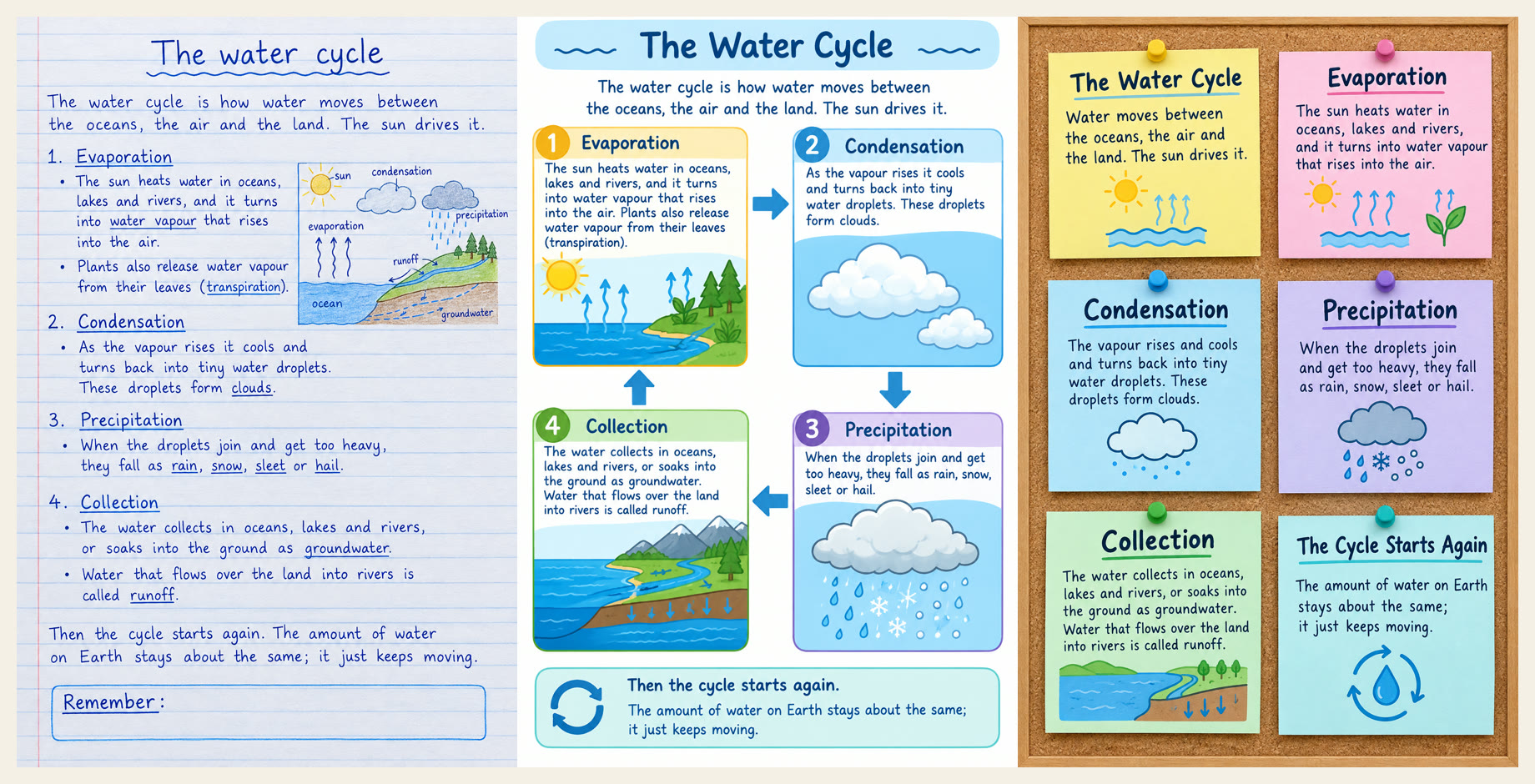
Turn my notes below into one page of neat handwritten study notes, like the best page in a student's notebook. Lined paper, a clear title at the top, numbered headings, short bullet points, key words underlined, one small labelled sketch, and a "Remember" box at the bottom. Keep every fact from my notes, add nothing new, and spell every word correctly. Make it a tall portrait image. My notes:
Make one clear diagram that shows how this topic works, so I can understand it in one look instead of rereading it. Show the steps in order with arrows, label each step with a short name and one short line that says what happens, and use a few simple colors. Use only facts from my notes and spell every word correctly. Make it a tall portrait image. My notes:
Turn my notes below into a cheat sheet of 6 sticky notes on a corkboard. One idea per sticky note: a bold title, at most 3 short lines, and a tiny drawing. Keep only what is worth remembering for a test, use pastel colors, and spell every word correctly. Make it a tall portrait image. My notes:
Same one we DM when you comment FACE.
Paste it into Nano Banana 2.1. We cut every close-up from the one image it made.
The trick is the flaw list: cracked knuckles, rope fibers, stubble at different lengths, no retouching. Perfect skin looks fake.
Swap the person, the place and the clothes for your own. Keep the skin, hands and camera lines.
Editorial magazine portrait photograph of a weathered fisherman, about 65 years old, on the deck of a small fishing boat on a grey overcast morning. Tight chest-up framing, vertical: his face fills the upper two thirds of the frame, and both of his hands are raised in front of his chest, holding a coil of wet, rough hemp rope, so his face and hands are in the same tight frame. He looks straight into the lens with calm, pale blue-grey eyes and a slight squint. Skin and face: deep crow's feet and forehead lines, wind-reddened cheeks and nose, scattered sun spots and small broken capillaries, visible pores, a few fine wiry hairs on the ears, uneven grey-white stubble about four days long with individual strands at different lengths and a few darker hairs, wet droplets of sea spray caught in the stubble and on the eyelashes. Eyelashes of varied length, moist eyes with a soft reflection of the grey sky. Lips slightly chapped. Hands: thick weathered fingers, cracked dry knuckles, short nails with dark lines under them, a healed white scar on one thumb, wet skin creases, rope fibers stuck to the palms. Clothing: a cream-colored hand-knit cable wool sweater, thick uneven yarn, loose wool fibers and small pills on the surface, a few dark wet patches from spray, one pulled loop. Light and camera: soft flat overcast daylight from the front-left, no flash, no retouching, no beauty filter, no makeup. Shot on a full-frame camera with an 85mm lens at f/5.6 so the whole face and both hands are sharp, background of grey sea and a blurred boat rail. True-to-life color, slight natural film grain, high detail. No text, no logos, no watermark.
Same one we DM when you comment POSTER.
Upload one clear photo of your face. Paste the main prompt, then swap in one style name and its style line. One style per try.
Keep the title to one short word, so the text comes out right.
We made all 20 with Nano Banana 2.1, one poster per style. Some styles change your clothes, hair or pose on purpose. That is the style, not a mistake.
Design one finished, professional graphic design poster in the [STYLE NAME] style. [STYLE LINE] Image 1 is my photo. Keep my face exactly like the photo (face shape, eyes, nose, hairline, hair colour), clearly visible and large enough to recognise, even when the style is drawn or stylised. Dress me in clothes that suit the style. Text: the poster title reads exactly "[TITLE]", spelled exactly like that. It is the only text on the poster: no subtitles, no dates, no fine print, no logos, no brand names, no watermarks, no signature. Vertical 2:3 poster filling the whole frame edge to edge, flat front view, no mockup, no wall, no frame, no hands holding it.
Minimalist poster: one flat pale sand background, generous empty space, one clean photo of me from the chest up, looking calmly at the camera in a plain white t-shirt, filling the lower half, his face large and clear; the title in a thin, widely spaced sans-serif, small, near the top left. Two colours only plus the photo. Calm, airy, gallery-like.
Maximalist poster: every inch filled, clashing patterns (leopard, florals, checkerboard), stickers, stars, fruit, flowers, sparkles, layered cut-out shapes in hot pink, orange, emerald and cobalt; my photo large in the middle, laughing, wearing a bold patterned blouse and big earrings; the title in a chunky, bubbly display font, huge, overlapping the layers.
Swiss International Typographic Style poster: strict asymmetric grid, off-white background, a black and white photo of the people in my photo side by side looking at the camera, cropped hard into a rectangle on the grid, one bold red bar; the title in a heavy grotesque sans-serif, flush left, very large, lowercase-free; clean thin black rules aligned to the grid.
Bauhaus poster: primary red, yellow and blue circles, squares and triangles on cream paper, thick black bars, geometric balance; my photo in black and white cut into a big circle, a slight smile; the title in a geometric sans-serif set at a 90 degree angle along the left edge.
Art Deco poster from the 1920s: black and gold, symmetric sunburst rays, stepped geometric frames, fan shapes; my portrait in a soft painted illustration style with a sleek wavy 1920s hairstyle and a pearl necklace, looking over her shoulder; the title in a tall, thin, high-contrast Deco display font in gold, centred at the top.
Pop art poster in the 1960s comic print style: Ben-Day halftone dots, thick black outlines, flat primary yellow, red and blue; the people in my photo drawn as comic-book characters, both laughing with wide open mouths, side by side; the title in a big comic burst shape with an exclamation-style outline (the title text itself stays exactly WOW).
Brutalist graphic design poster: harsh, raw, anti-design; a grainy black and white photo of me with a flat stare, photocopied and high contrast; a default-looking heavy sans-serif title, enormous, cut off by the edge; plain grey background, one acid green block, visible thick black borders, nothing decorative.
Y2K poster from the early 2000s: glossy chrome liquid metal shapes, baby blue and pink gradients, sparkles, butterflies, a holographic sheen; my photo with glossy lip gloss, tiny hair clips and a silver top, flash-photo look; the title in shiny bubbly chrome 3D letters.
Cyberpunk poster: rainy night street, magenta and cyan neon light, glowing signs with no readable words, a futuristic city behind; my photo in a dark techwear jacket, neon rim light on my face, rain on my hair; the title in a glitchy angular futuristic font glowing cyan.
Glassmorphism poster: soft blurred colour blobs of violet, peach and mint behind frosted translucent glass panels with thin white borders and soft shadows; my photo sits inside one large frosted glass card, smiling softly in a white knit top; the title in a clean rounded sans-serif on a smaller glass card.
Memphis design poster from the 1980s: squiggles, zigzags, confetti dots, terrazzo pattern, pastel pink, mint, yellow and black geometric shapes; the people in my photo in a cut-out photo, playful poses, colourful 80s clothes; the title in a bold playful geometric font with a black drop shadow.
Russian Constructivist poster style: only red, black and cream, strong diagonal composition, bold blocky sans-serif title set on a steep diagonal, overlapping geometric bars; a high-contrast black and white photo of me looking up and forward with determination; no flags, stars, sickles or any political symbols.
Psychedelic 1960s concert poster: swirling melting shapes, vibrating complementary colours (orange and violet, green and pink), flowers, wavy op-art lines; my portrait drawn in the same flowing style with long wavy hair turning into swirls; the title in hand-drawn melting, bulging psychedelic lettering.
Mixed-media paper collage poster: torn magazine paper, cut-out photos from my photo with white paper borders, a vintage map, tape, halftone textures, flowers, a cut-out moon and planets, layered with real paper shadows; the title made of letters cut from different magazines, ransom-note style.
Fashion magazine cover editorial design: a close-up studio portrait of me, elegant black blazer, soft light, the masthead title huge in a high-contrast serif across the top, partly behind my head; a clean white background; no other cover lines or text.
Vaporwave poster: pink and teal sunset gradient, a wireframe grid floor, palm trees, a marble bust and an old computer window frame, VHS scan lines; my photo washed in pink and cyan with sunglasses pushed up in my hair; the title in wide spaced chrome serif letters.
Art Nouveau poster from 1900: an ornate decorative frame of flowing whiplash lines, lilies and vines, muted gold, sage and dusty rose; my portrait drawn as an elegant illustration with long flowing hair woven into the floral frame, a circular halo-like motif behind my head; the title in an organic hand-lettered Nouveau font.
Graffiti street poster: a brick wall covered in spray paint, drips, tags with no readable words, paint splatter; my photo pasted on the wall as a wheat-paste print with torn edges, wearing a hoodie, grinning; the title as a big colourful wildstyle graffiti piece with arrows and outlines, still clearly readable.
Duotone poster: one photo of the people in my photo back to back, laughing, printed in only two colours, deep navy shadows and electric coral highlights; a bold condensed sans-serif title, very large, in coral at the bottom; nothing else, strong and simple.
Handwritten poster: warm off-white paper, everything drawn by hand with black ink and coloured markers; the people in my photo drawn as a loose hand-drawn ink sketch, side by side, waving, with yellow marker colour on one top and red on the other; the title in big hand lettering in black marker, with small doodled hearts, stars and arrows around it.
Same one we DM when you comment PROMPT.
One prompt, pasted unchanged into Seedance 2.5 and Wan 3.0. No reference image, no retries, no fixes.
Settings for both: 16:9, 10 seconds, 480p, sound on. Then both upscaled to 1080p with Topaz Proteus.
Photoreal street-food footage. A night market in Bangkok: a middle-aged street cook in a sweat-darkened white tank top and a faded blue apron works a big black carbon-steel wok over a roaring gas burner under a string of warm bulbs. Behind him, out of focus, a busy market lane with paper lanterns, steam and people walking past. One continuous shot, no cuts, 10 seconds. Handheld medium close-up at chest height from across the cart, slightly low, the wok and his hands filling the lower half of the frame and his face lit orange by the flame. In the first seconds he tips oil into the hot wok and a tall column of fire bursts up around the pan, lighting his face. In the middle he grips the wok handle and tosses a big load of thick noodles, bean sprouts and chopped spring onions high into the air with two sharp flicks, the noodles flipping through the flames and landing back in the wok, while his other hand stirs with a long steel ladle. In the last seconds the fire drops, he tilts the wok and slides the glossy noodles onto a white plate in one smooth pour, steam rising, and he wipes his forehead with the back of his wrist. Real fire and food physics: flames licking up the sides of the wok, oil spitting, single noodles and sprouts flying and falling with weight, thick steam and smoke drifting through the bulb light. Sharp detail on his hands, the wet noodles and the scratched wok, natural motion blur on the toss. Sound: Roaring gas burner, a loud whoosh when the fire bursts up, oil sizzling and spitting, the steel ladle scraping and clanging on the wok, noodles slapping back into the pan, market crowd chatter and a passing scooter in the background. NO MUSIC, NO SCORE, NO PIANO, NO ACOUSTIC GUITAR, NO STRINGS. No speech. No subtitles, no text, no logos, no watermark.
Same one we DM when you comment REBUILD.
Open Claude Code, paste the prompt and give it the video. No project file needed.
It pulls out every frame, lists each word, shape and icon, then draws it all again as one HTML page on one animation timeline.
It renders the page to an MP4, checks it against the original side by side and fixes what is off.
It is not perfect. Photos come out as simple drawings, and the font and icons come out a bit different.
Here is a short motion graphic video. Rebuild it in code from the video alone. You do not get its project file or its assets. 1. Use ffmpeg to pull every frame out of the video, plus one contact sheet of frames across the whole clip. Write down its size, frame rate and length. 2. Study the frames. List every element (each word, shape and icon), its colours, its size and position, and the frame where it comes in, moves and goes out. 3. Build it again as one HTML page. Draw every word, shape and icon in code (HTML, CSS and SVG). Do not use screenshots or images cut from the video. If something is a photo, draw a simple version of it. If you cannot name the font, use the closest free Google font. 4. Time all the motion on one GSAP timeline. Render the page to an MP4 at the same size, frame rate and length. HyperFrames does this (npx hyperframes render), or use a headless browser and ffmpeg. Copy the original's sound onto your render with ffmpeg. 5. Check your copy against the original: put the same frames side by side at 4 to 6 key moments, list what is off (position, size, timing, colour, font, shape) and fix it. Repeat for up to 5 rounds, or until nothing is off by more than a few pixels or one frame. 6. Tell me what still differs. Ask me for the video before you start.
Same one we DM when you comment LINE.
Paste it into ChatGPT, Claude or Gemini, with your post idea in the brackets.
It tells you if your idea sits below the line, and rewrites it around a real use or a story.
It leaves gaps for your own results. Fill them with real ones.
You are a strict editor for short social videos about AI. Picture a pyramid with a red line at the bottom that rises every time a new AI model comes out. Below the line is anything one prompt can make on its own: the same AI portraits, "ten AI tools" lists, generic tips anyone could copy. Above the line is AI used for something real: the creator's own idea, a real problem they solved, or their own story. Here is my post idea: [PASTE YOUR POST IDEA] 1. Say if it sits below or above the line, in one sentence, and why. 2. If it sits below the line, rewrite it twice: once around a real use (a real task it does for me, with a result I can show) and once around a story (something that happened to me). Keep each rewrite to three lines. 3. Ask me one question that would make it more mine. Do not invent results, numbers or stories for me. Where you need one, leave a [gap] for me to fill.
Same one we DM when you comment JOBS.
Open a new chat. Paste your CV, then prompt 1 under it. Send prompts 2 and 3 in the same chat.
Prompt 2 uses the X-Y-Z shape: what you did, the number, and how. It marks every missing number instead of making one up. Fill those in yourself.
Prompt 3 searched the web and built the sheet for us in a normal chat. Ours found four real leads. One had a date it could not confirm, and two links went to a search page instead of one job.
Prompt 4 needs Work, which is on paid plans only. We have not run it ourselves. Work asks before it does anything you cannot undo, and some job sites block it.
Check every job and every CV line before you send anything.
Read my CV like a recruiter in my field. List the 10 job titles I fit best, and for each one the words recruiters search for.
Rewrite my CV as one master version. Every bullet: what I did, the number, and how (the Google X-Y-Z shape). Flag anything a recruiter would doubt, and mark where I need a real number.
Find jobs posted in the last 7 days for my top 5 titles, in [your city] or remote. Build a spreadsheet: title, company, link, date posted, match score, and the 3 CV lines to change for each.
Run this job search every Monday and add only new jobs to the sheet.
Same one we DM when you comment BEST.
Each prompt went unchanged into Seedance 2.5, Wan 3.0 and Omni Flash. 16:9, 6 seconds, sound on, one take each.
Product ad: Wan 3.0. The only one that moved the camera.
Anime: Seedance 2.5. Omni Flash rode a flat road, not the hill.
Action: Seedance 2.5. Wan jumped bigger, then landed flat on his back.
Real person: Seedance 2.5. It looked like a phone video. Wan's looked like an actor.
One take per model is a small test. Try your own shot before you switch.
Luxury perfume commercial. A faceted glass perfume bottle with amber liquid and a gold cap stands on wet black stone. A splash of clear water bursts up around the bottle in slow motion, droplets catch warm rim light. The camera glides in a slow half circle around the bottle. Dark studio background, soft reflections on the wet stone. One continuous take, no cuts. Sound: water splash, soft droplets falling, quiet room tone. NO MUSIC. No text, no logos, no labels on the bottle.
Hand-drawn 2D anime style, bright summer colours, clean line art. A teenage girl in a white shirt and a straw hat rides a bicycle fast down a steep hill road toward the sea. Her hair and a red ribbon fly in the wind, a sunflower field rushes past beside the road. The camera tracks beside her at her speed, then she lifts her feet off the pedals and laughs. Blue sea and tall white clouds ahead. One continuous take, no cuts. Sound: rushing wind, bicycle chain ticking, her short happy laugh. NO MUSIC. No text, no subtitles.
Cinematic action shot. A parkour runner in a black hoodie sprints across a city rooftop at sunset, leaps across a wide gap to the next building, lands in a roll and keeps running. The handheld camera runs right behind him and follows him through the jump. Orange sun low between the towers, dust kicks up on the landing. One continuous take, no cuts. Sound: fast footsteps on gravel, heavy breathing, wind rush during the jump, a thud and roll on landing. NO MUSIC. No text.
Realistic handheld phone video, natural window light. An elderly woman with grey hair in a bun and a floral apron stands at her stove in a small warm kitchen. She lifts a wooden spoon of steaming soup, blows on it, tastes it, closes her eyes for a moment, then smiles at the camera and says: "Mm. Now that is a proper soup." Medium close-up, the camera holds steady at her eye level. One continuous take, no cuts. Voice: warm, slightly raspy older woman, slow and proud, a little playful. Sound: soup simmering, the spoon tapping the pot. NO MUSIC. No text, no captions, no subtitles.
Same one we DM when you comment TEXT.
Film one clip of yourself: pinch your thumb and index finger in front of the camera, then spread them slowly.
Open Claude Code (or any coding agent), paste the prompt and give it your clip and your words.
It tracks both fingertips in every frame with Google's free hand tracker, then draws your words between them. The gap sets the size, so there are no keyframes.
We tested this prompt on our own pinch clip: the words followed the fingers on both pinches.
I have a short video of me pinching my thumb and index finger in front of the camera, then spreading them apart. Build a text effect in code: words sit between my two fingertips and grow and shrink with the gap, with no keyframes. 1. Write a Python script that reads my video frame by frame with OpenCV and runs Google's free MediaPipe Hand Landmarker on every frame (up to 2 hands). For each frame, save: hand found or not, the thumb tip (hand point 4) and the index fingertip (hand point 8) in pixels, and the distance between them. Save all frames to one JSON file. 2. Track the pinching hand. If both hands are in shot, use the one doing the pinch, not a hand resting low in the frame. A hand at the bottom edge (fingertips in the lowest 12% of the frame) is not the pinch: count it as lost. 3. Clean the track. A gap under about 25 px (on a 1080 px wide video) is a false read, so count it as lost. Smooth each fingertip over the frame and its two neighbours. When the hand is lost for a moment inside a pinch, hold the last good position. 4. Find each pinch: the fingers close, spread, and close or drop again. Give each pinch its own words. My words: [WORDS FOR PINCH 1], [WORDS FOR PINCH 2]. Show words only during a pinch. 5. Draw the words: centred on the midpoint between the two fingertips, font size = gap x 0.17 (at least 22 px, at most 150 px), white handwritten text (the free Google font Gochi Hand) with a dark outline. 6. Make the text its own transparent layer and lay it over my video with ffmpeg, so the video's colours do not change. Keep my audio. Same size, frame rate and frame count as my video. 7. Also make a debug video with the two fingertips marked, so I can see where the tracking drops. Install what you need (mediapipe, opencv-python, Pillow, ffmpeg) and download the hand model (hand_landmarker.task) and the font from Google. Ask me for my video file and my words before you start. Tip: pinch slowly. A blurry, fast hand loses the tracking.
Same one we DM when you comment CCTV.
Use your own clip, or one you made. Never someone else's footage of real people.
Attach the clip in Claude, fill in its length and paste the prompt. You get an action map, a shot list that matches every second, and one Seedance 2.5 prompt.
Then in Seedance 2.5: attach the same clip as the video reference, paste that prompt and set the same length as the clip.
On our 12 second raccoon clip, Claude wrote 10 shots, and every move in the movie version landed on the same second as the camera.
Watch this security-camera clip frame by frame. It is [LENGTH] seconds long. 1. Write an action map: every action with its start and end second, in order. Note anything that is hidden or unclear instead of guessing. 2. Turn it into a movie scene: 8 to 12 shots that cover the same actions at the same seconds, each with one camera idea that has a story reason (a close-up for the key moment, a low angle for tension, a wide for the escape). Give me a sync map table: CCTV seconds, then the movie shot. 3. Write one Seedance 2.5 prompt for the whole scene, same length as the clip, with my clip attached as Video 1: - Open with: "Refer only to the actions, their order and their timing in @Video 1. @Video 1 is a guide for choreography, not footage: every frame is newly filmed on a cinema camera with normal lenses, with no security-camera angle, no fisheye and no night-vision look." - Then one "Shot N — target 00:00-00:02." line per shot. - Then the light and the look, and a sound line for each shot. - No text, no logos, no subtitles.
Same one we DM when you comment LAVA.
Run it as a Wan 3.0 video edit on your own clip, under 15 seconds.
The trick is timing. Tie each change to a move you already make in the clip: a hand flick, a finger snap, a point at the sky.
Change the times in the prompt to the seconds of your own moves.
Edit Video 1. One continuous shot without cuts, with the same fixed camera, the same wide lens, the same framing and the same beach as Video 1. Keep the man exactly as he is: his face, hair, skin and build. Keep his performance exactly the same: every step, turn, gesture, head move and expression at the same moment from the first frame to the last, his line at the start, the hand flick, the shrug, the finger snap, the point to the sky and the walk back to the camera. Change three things, each at its moment: 1. From 00:04.5, the moment he raises his hand toward the sea: far out in the sea behind him a colossal lava monster bursts up out of the water, a giant of cracked black rock with glowing orange-red lava in every crack and glowing eyes, rising to its chest with huge clawed hands lifting, throwing up a wall of white spray and hissing steam, with a burst of fire on the water. It roars and reaches toward the shore. While he shrugs at the camera it slowly sinks back into the sea in a cloud of steam, fully gone by 00:07. 2. From 00:07.5, the moment he snaps his fingers beside his face: his swim shorts and bare chest change at once into a sharp black tuxedo with a white shirt and a black bow tie, with black shoes on the wet sand. He wears it to the end of the video. 3. From 00:08, the moment he points up at the sky: the bright blue sky darkens fast into heavy dark storm clouds, the sea turns grey-green with wind-whipped white caps, a bright lightning bolt strikes the sea on the horizon at 00:09, and the light on him turns cool and dim. The storm stays to the end. Before 00:04.5 nothing changes: sunny blue sky, calm turquoise sea, swim shorts. Sound: his voice exactly as in Video 1, open-air waves and wind, a deep earth-shaking roar and a huge splash with hissing steam at 00:04.5, a sharp whoosh on the snap at 00:07.5, rolling thunder and a lightning crack at 00:09, wind and rain to the end. NO MUSIC, NO SCORE. No text, logos or captions anywhere.
Same one we DM when you comment STYLE.
Upload one photo. Paste the base prompt, then add one style line after it. One style per try.
Only the style line changes. That keeps the pose and the faces the same every time.
A photo with clear faces and good light works best.
We made ours with Nano Banana 2.1. Woodblock print never worked after two tries, so paper cut-out took its spot.
Redraw this exact photo in a new art style. Keep the same pose and the same expressions. Keep every face recognizable: the same hair and the same clothes. Keep the background things in the same place. Change only the art style. Fill the whole frame, no text, no letters, no border, no frame.
1950s mid-century limited-animation cartoon: very stylized geometric people, wedge-shaped heads, long thin necks, angular hands, dot eyes, faces built from simple shapes but still showing each person's hair and face, thin uneven ink outlines, flat mustard, turquoise, coral and black shapes that do not line up with the outlines, an atomic starburst and a boomerang-shaped side table, paper grain, no shading, nothing realistic.
European clean-line comic panel: even black ink outlines, flat bright colours, no hatching, simple dot eyes, soft flat shadows, a tidy living room drawn in the same clean line.
Risograph zine print in only three inks, fluorescent pink, blue and yellow, on off-white paper, coarse halftone dots, slightly misregistered colour layers, grainy texture.
Stop-motion claymation: both people sculpted from soft plasticine with visible thumbprints, rounded chunky shapes, a miniature clay living room and clay plant, soft studio light, shallow depth of field.
Layered paper cut-out craft: the whole scene built from cut sheets of coloured card stacked in layers, soft real shadows between the layers, visible paper fibre and clean scissor-cut edges, faces made of a few cut paper shapes that still show both laughing, the plant as cut green paper leaves, photographed from the front in soft daylight.
1990s hand-painted anime cel: big expressive eyes, clean cel shading with one hard shadow tone, soft painted background, warm afternoon light, slight film grain like an old TV frame.
Renaissance oil portrait: rich glazed oil paint, soft chiaroscuro light from one side, dark warm background with the plant in shadow, fine cracked varnish.
Children's storybook watercolour: soft washes that bleed at the edges, light pencil lines showing through, white paper left for highlights, gentle pastel colours.
Stained-glass church window: the scene built from pieces of coloured glass held by thick dark lead lines, light glowing through the glass, jewel colours, the plant as green glass leaves.
16-bit video game pixel art: big visible square pixels, a limited bright palette, simple pixel faces with clear smiles, a pixel living room and pixel plant, no blur, no anti-aliasing.
Same one we DM when you comment PROFILE.
Menus look a little different by plan, region and device. Every step here comes from OpenAI's own help pages (checked October 2026).
1. Ask it. Open a new chat and paste the prompt below. OpenAI says you can ask ChatGPT what it remembers about you.
2. Read the summary. Go Settings, Personalization, Memory. That's the summary it keeps, and OpenAI says it doesn't show every detail Memory can use.
3. Wipe the summary. Tap the three dots (•••) and pick "Delete and turn off memory". That deletes what the summary shows and turns Memory off.
4. Delete the chats too. Wiping the summary doesn't delete your past chats, and if you turn Memory back on, it can learn from the ones you kept. Delete the ones you don't want it to use. Archived chats still count.
5. Check saved memories. Deleting a chat doesn't always delete a memory saved from it, so delete both.
6. Use a Temporary Chat for private questions. Temporary chats don't create or update memories.
7. Stop training on your chats. Go Settings, Data controls and turn off "Improve the model for everyone". New chats then aren't used to train OpenAI's models. This one doesn't delete anything.
List everything you remember about me. Every item, no summary.
Same one we DM when you comment SPRINT.
One Seedance 2.5 render: 12 seconds, 4:3, 480p, sound on. Every shot is in this one prompt.
Give it a music track as @Audio 1. We made a 12-second trap beat with Lyria 3 Pro, with a silence and a drop at 5 seconds. The model cuts to the music.
Change the sport, the kit and the place for your own brand.
@Audio 1 is the background music track. Play music in the style, sound and energy of @Audio 1 from the first frame to the last: hard instrumental trap and dubstep beat, a tense snare build, one second of silence, then a heavy distorted bass drop with hard kicks and snares, no vocals. The edit is cut to this music: every cut lands on a beat, the cuts get faster in the build, the picture holds still in the silence, and the big drop at 5 seconds hits exactly as the sprinters explode out of the blocks. A fast-cut sports campaign ad, edited like a big athletic brand commercial, for a women's sprint squad at an outdoor athletics stadium. Hard midday sun, deep blue sky, long sharp shadows, a bright cobalt-blue running track with crisp white lane lines, a big empty concrete grandstand under a steel roof. Warm, contrasty commercial film look, shallow depth of field, natural motion blur on fast action. Low camera angles throughout. Same in every shot: the same five women sprinters in their twenties, athletic and muscular, different skin tones and hair, ordinary real faces with natural skin texture. They wear a matching team kit: fitted sleeveless crop tops and fitted running shorts in red, cobalt blue, purple, black and hot pink (one colour per athlete), white crew socks, white track spikes. The same stadium and the same blue track in every shot. No text and no captions on screen. Shot 1 — target 00:00-00:01, on the build. Ground-level close-up at the starting line, 24mm: one white spike shoe slams down into a starting block, the other athletes' legs blurred behind. Hard cut on the beat. Shot 2 — target 00:01-00:02. Low-angle wide, 24mm: the five do high-knee drills down the lane toward camera, long shadows stretching across the track. Hard cut on the beat. Shot 3 — target 00:02-00:03. Close-up, 50mm, subtle handheld: a sprinter's hands pull her spike laces tight. Hard cut on the beat. Shot 4 — target 00:03-00:04, in the silence. Medium shot, 35mm, the camera holds still: all five sit side by side on the grandstand bench, elbows on knees, looking straight into the lens, calm and confident. Hard cut. Shot 5 — target 00:04-00:05, still in the silence. Ground-level close-up, 50mm: five pairs of fingertips set on the white start line, everyone frozen, waiting. Hard cut exactly on the drop. Shot 6 — target 00:05-00:06, on the drop. Low wide from the side, 24mm: all five explode out of the blocks at once in heavy motion blur. Hard cut on the beat. Shot 7 — target 00:06-00:07. Fast tracking shot beside the runners at hip height, 35mm, the camera racing along the track, then a whip pan down to the blurred lane lines. Hard cut on the beat. Shot 8 — target 00:07-00:08. Low wide from behind, 24mm: the five sprint away down the straight toward the grandstand, all in step. Hard cut on the beat. Shot 9 — target 00:08-00:09. Close-up from the side, 85mm: one sprinter's face in full flight, jaw set, sweat in the sun. Hard cut on the beat. Shot 10 — target 00:09-00:10. Looking straight up from the ground, 16mm: the five stand in a circle above camera against the blue sky and slam their hands together in the middle. Hard cut on the beat. Shot 11 — target 00:10-00:12, the final shot lingers. Static wide, 35mm: the five sit far apart and small on the huge empty grandstand, still, sun on the concrete, as the music ends. Sound: the music of @Audio 1 drives the whole ad. Under it, quiet spikes on the track and quick breaths. No vocals, no singing, no rap, no spoken words, no shouting.
Same one we DM when you comment EDIT.
Claude Code edited that reel from a skill: a written recipe of steps it follows, the way an editor follows notes. Here is what it did:
1. Timed every word I said: 85 words, each with its own start time.
2. Cut the take, so I am on camera for the hook and the end.
3. Wrote 36 caption lines, each one written in as I say it.
4. Drew 10 screens in code, one for each line of the script.
5. Put 15 sounds on the cuts and taps.
6. Mixed the music about 20 LU under my voice, so every word stays clear.
7. Rendered it, then checked it: still frames, Instagram's button areas and a full listen.
We still chose the look. Claude did the work.
The prompt below is a simpler start for your own clip. We ran it in a fresh Claude Code session on one of our clips: it timed the words, cut the silence, made it 9:16 and burned in the captions. You need Claude Code and ffmpeg. It used faster-whisper for the word times, which we already had installed.
My talking clip is clip.mp4 in this folder. Edit it into a vertical reel for Instagram, step by step: 1. Transcribe it with a time for every word (use faster-whisper or whisperx if you have it). 2. Cut the silence at the start and the end. 3. Make it 9:16 at 1080x1920, keeping my face in frame. 4. Burn in short captions, 2 or 3 words at a time, each showing while I say it, white with a thin dark outline, in the lower middle of the frame but above the bottom fifth, where Instagram puts its buttons and caption. 5. If music.mp3 is in this folder, put it under my voice, much quieter than me. 6. Render it as reel.mp4. 7. Check your work: take a still frame at three moments and confirm the caption on screen matches the word I am saying. When you finish, write steps.md with every step you ran and what it made.
Same one we DM when you comment FIRE.
Start with one clip of yourself: fixed camera, plain background, a few clear hand moves, palms up near the end.
Run each prompt as a Wan 3.0 video edit of that same clip. Each edit changes one thing and keeps every move on the same frame, so you can cut between them right on the beat.
Fill the brackets: what you wear in your clip, and the second your palms open.
Edit Video 1. One continuous shot without cuts, with the same fixed camera, the same framing, the same background, the same light as Video 1. Keep the person exactly as they are: face, hair, skin and build. Keep the performance exactly the same: every hand move, head move, expression and mouth movement at the same moment from the first frame to the last. Change one thing, from the first frame to the last: the [CURRENT TOP] becomes a cream linen two-piece suit, a relaxed unstructured jacket with soft lapels over an open-collar white linen shirt, real creased linen fabric that moves with the arms. No tie, no jewellery, no logos. Sound: the voice exactly as in Video 1, the same quiet room. NO MUSIC, NO SCORE. No text, logos or captions anywhere.
Edit Video 1. One continuous shot without cuts, with the same fixed camera, the same framing, the same background, the same light as Video 1. Keep the person exactly as they are: face, hair, skin and build. Keep the performance exactly the same: every hand move, head move, expression and mouth movement at the same moment from the first frame to the last. Change one thing, from the first frame to the last: the [CURRENT TOP] becomes a red wool varsity jacket with cream leather sleeves, cream and red striped ribbed cuffs, collar and hem, and snap buttons, worn open over a plain white T-shirt. Real wool and leather that move with the arms. No letters, numbers, patches or logos on the jacket. Sound: the voice exactly as in Video 1, the same quiet room. NO MUSIC, NO SCORE. No text, logos or captions anywhere.
Edit Video 1. One continuous shot without cuts, with the same fixed camera and the same framing as Video 1. Keep the person exactly as they are: face, hair, skin and build. Keep the performance exactly the same: every hand move, head move, expression and mouth movement at the same moment from the first frame to the last. Change three things: 1. From the first frame to the last: the [CURRENT TOP] becomes a black leather coat, worn open over a plain black crew-neck top, real soft leather with creases that move with the arms. 2. From the first frame to the last: the background becomes a warm loft at dusk, exposed red brick walls, a tall window on the left with blue evening light, a big green plant, and warm amber lamps, softly out of focus. 3. From [TIME], the moment the person lifts both hands out to the sides with the palms facing up: a small real flame lights in the centre of each open palm. The two flames grow bigger and brighter while the palms stay up, real orange fire flickering upward, lighting the face, coat and hands with warm moving light, to the end of the video. The hands stay unhurt and relaxed. Sound: the voice exactly as in Video 1, a soft whoosh when the flames light at [TIME], then the low roar and crackle of fire to the end. NO MUSIC, NO SCORE. No text, logos or captions anywhere.
Same one we DM when you comment LIVE.
Open Gemini Live and say the whole job out loud: when it runs, what it reads, what it picks and what it writes. Live hands it to Gemini's task agent (Google calls these Tasks), and it runs on that schedule, even with your phone locked.
Swap in your own doc name, day and time. It sorts the ideas you already have. It does not have new ones for you.
We have not run this one ourselves yet, so check the first plan it writes before you trust it.
What you need: Google AI Pro or Ultra, 18 or older, a personal Google account (not work or school), Keep Activity and Personal Intelligence turned on, and the Gemini app on your phone or Mac, or gemini.google.com. Not available in the EEA, the UK, Switzerland or Nigeria.
Every Sunday at six, read Liana's idea doc, pick the five best, and write next week's plan.
Every Sunday at 6 pm, read my Google Doc called [your ideas doc], pick the five best ideas, and write next week's plan in a new Google Doc: one idea per day from Monday to Friday, each with a first line and what to film.
Every Monday at 9 am, find last week's receipts in my Gmail and add each one to my Google Sheet called [your receipts sheet]: date, shop and amount.
Same one we DM when you comment FILM.
Step 1: make the storyboard sheet with Nano Banana 2.1, 21:9. One image holds all 12 frames.
Step 2: render the film with Seedance 2.5 in one go: 30 seconds, 16:9, 480p, sound on. The film prompt follows the 12 frames shot for shot. No reference image.
Step 3: upscale to 1080p. We used Topaz Proteus.
Planning first is why the story holds together for 30 seconds.
A film director's hand-drawn storyboard sheet: exactly 12 panels in a perfect grid of 4 columns and 3 rows, read left to right, top to bottom. Every panel is the same size, a wide 16:9 rectangle with a thin black ink border. The panels are separated by even pure white gutters, and the sheet has an even pure white margin all round. Nothing else on the sheet. Drawing style in every panel: quick confident pencil sketch with soft grey marker shading on white paper, loose cinematic storyboard linework, clear silhouettes, simple backgrounds. Only two colours are added with marker: the school bus is warm yellow and the lunchbox is bright red. Everything else stays pencil grey. The same two characters in every panel where they appear: a golden retriever with a fluffy coat and a red collar, and a 9-year-old boy with messy hair, a green hoodie and a blue backpack. Panel 1: close-up at the dog's eye level on a house porch, the dog holds the red lunchbox by its handle in its mouth, ears up, while behind him the yellow school bus pulls away down the street. Panel 2: low side tracking view, the dog sprints down the front path and leaps over a low white garden gate, the lunchbox in its mouth. Panel 3: inside the bus, medium shot of the boy by the back window, his open backpack on his lap, he realises the lunchbox is missing, face falling. Panel 4: wide street view, the dog runs along the sidewalk right beside the moving yellow bus, small town street with trees. Panel 5: a busy outdoor farmers' market, the dog weaves between fruit stalls, apples tumble from a crate, a vendor jumps back. Panel 6: a crossing guard in a reflective vest raises a startled hand as the dog dashes across the crosswalk in front of her. Panel 7: extreme low close-up of the dog's paws pounding the pavement, the red lunchbox swinging above them. Panel 8: a park, the dog leaps over a wooden bench as ducks scatter off the path. Panel 9: wide view of the yellow bus pulling up in front of a red-brick school, children stepping off. Panel 10: the boy steps off the bus looking sad, then turns his head toward the camera at a sound. Panel 11: the dog skids to a stop on the pavement in front of the boy and drops the lunchbox at his feet, tail up, tongue out. Panel 12: the boy kneels and hugs the dog, laughing, other children around them smiling. No text anywhere: no panel numbers, no captions, no arrows, no notes, no titles, no lettering on the bus, no signs, no logos, no watermark.
A warm, funny live-action short film in 12 shots, shot on 35mm film, soft late-morning sun in a leafy small American town in early autumn. Natural colours, gentle film grain, real locations, real animal movement. Same in every shot: the dog is one golden retriever with a fluffy golden coat and a red collar. The boy is about 9 years old, with messy light-brown hair, a green hoodie, jeans and a blue backpack. The lunchbox is a small bright red metal lunchbox with a handle. The school bus is a plain yellow school bus with no lettering. Golden hour warm light throughout. Shot 1, target 00:00-00:02.5. 50mm, close-up at the dog's eye level on a wooden house porch. The golden retriever holds the red lunchbox by its handle in his mouth, ears up, eyes fixed down the street, as behind him, out of focus, the yellow school bus pulls away from the curb. Shot 2, target 00:02.5-00:05. 28mm, low side tracking shot. The dog sprints down the front path and leaps over a low white picket garden gate, the lunchbox swinging in his mouth. Shot 3, target 00:05-00:07.5. 35mm, inside the moving bus, medium shot of the boy in a seat by the window, his blue backpack open on his lap. He searches it, stops, and his face falls: the lunchbox is not there. Shot 4, target 00:07.5-00:10. 24mm, wide street view. The dog runs along the sidewalk right beside the moving yellow bus under a row of autumn trees. Shot 5, target 00:10-00:12.5. 28mm, a busy outdoor farmers' market. The dog weaves between fruit stalls, a crate of red apples tips and apples roll across the ground, a vendor in an apron jumps back with his arms up. Shot 6, target 00:12.5-00:15. 35mm, a crosswalk. A crossing guard in a reflective vest raises a startled hand as the dog dashes across the stripes in front of her. Shot 7, target 00:15-00:17.5. 24mm, extreme low close-up tracking with the dog's front paws pounding the pavement, the red lunchbox swinging just above them. Shot 8, target 00:17.5-00:20. 35mm, a park path. The dog leaps clean over a wooden bench as a group of ducks scatter off the path, flapping. Shot 9, target 00:20-00:22.5. 24mm, wide view. The yellow bus pulls up in front of a red-brick school and children with backpacks step off. Shot 10, target 00:22.5-00:25. 50mm, medium shot. The boy steps down off the bus looking sad, then hears a bark and turns his head, surprised. Shot 11, target 00:25-00:27.5. 35mm, low angle. The dog skids to a stop on the pavement in front of the boy and drops the red lunchbox at his feet, tail wagging, tongue out, panting. Shot 12, target 00:27.5-00:30. 50mm, slow push in. The boy drops to his knees and hugs the dog, laughing, as other children gather around smiling. The final shot lingers. Sound: a light, bouncy playful orchestral chase score with plucked strings and a cheeky clarinet, building with the chase and turning warm at the hug. Under it: the bus engine and doors hissing, paws on wood and pavement, a garden gate rattle, market chatter, rolling apples, ducks quacking and flapping, one happy bark, children laughing. No dialogue, no spoken words. No text anywhere: no titles, no subtitles, no signs, no lettering on the bus, no logos, no watermark.
Same one we DM when you comment MODELS.
We ran the same shots through Seedance 2.5, Wan 3.0, Omni Flash and MiniMax H3. Same first frame, one prompt per model.
A person talking to camera: Seedance 2.5. Every take said the exact line.
Hands doing a task, like writing with a marker or unboxing: Seedance 2.5. It wrote smoothly. The others glitched.
A camera move around a product: Wan 3.0. It was the only one that moved the camera around the product. Seedance and Omni spun the product instead. Wan costs about a third of Seedance.
A cartoon or clay character: every model passed, so take the cheapest or the fastest. Omni was the fastest for us. MiniMax was the cheapest.
Four kinds of shots is not every job. Test yours before you switch.
Same one we DM when you comment VOICE.
Ask ChatGPT for something first, like an email or a caption. Then paste one of these in the same chat and it rewrites its own reply.
Prompt 2 is the big one. Paste three things you wrote yourself. Mix them up: a message, a post, an email. It lists how you write, then rewrites in that style.
To keep your style, copy that list into Settings, Personalization, Custom instructions. New chats start with it.
We ran all five on the free plan, one try each. Our test email went from "Please note that Friday's meeting has been rescheduled to Monday at 10:00 AM" to "Friday's meeting is moved to Monday at 10 AM."
It copies your style, not your facts. Read it before you send.
Rewrite your email the way a real person would type it: short sentences, everyday words, no warm-up opener, no summary at the end.
Here are three things I wrote. 1) "[paste something you wrote]" 2) "[paste something else you wrote]" 3) "[paste a third thing you wrote]" First, list how I write: sentence length, words I use, words I never use, how I open and how I close. Then rewrite your caption in that style.
Rewrite this and cut the words that make it sound like a template, like delve, moreover, tapestry, game-changer, journey, "in today's fast-paced world", and long dashes. Rewrite those sentences instead of swapping in synonyms.
Rewrite this to be said out loud: short breaths, no lists, only words I would really say at a dinner table.
Pick one side and tell me why, in three sentences. No "it depends".
Same one we DM when you comment ORDER.
This is the order Seedance's own prompt guide lists. Fill one line per part, then join them into one paragraph.
One camera move per shot. The camera comes fifth, not first.
The order will not save a bad idea. It just puts your words where the model expects them.
1. Subject: [who or what is in the shot, and what they look like] 2. Action: [what they do, step by step] 3. Place: [where it happens] 4. Light: [the light and the time of day] 5. Camera: [one camera move only, and the lens or angle] 6. Style: [the look, for example shot on 35mm film] 7. Quality: [sharp detail, clean motion] 8. Leave out: [no text, no music, no people, and so on]
A fluffy ginger tabby cat with amber eyes sits on a light oak kitchen table next to a full white ceramic mug of black coffee. The cat looks at the camera, then slowly stretches one front paw and pushes the mug across the table, little by little, until it tips over the edge and falls, and the coffee splashes out in a dark arc in slow motion. A bright white home kitchen in the morning, a window with half-open blinds behind the table, a green plant on the counter. Soft morning sun comes through the window from the left, warm highlights on the fur, gentle shadows on the table. Low camera at table height, one slow push-in toward the cat. Shot on 35mm film, natural colours, shallow depth of field. Sharp fur detail, clean realistic motion, high definition. No text, no subtitles, no music, no people. Sound: only the soft scrape of the mug on the wood and the splash.
Same one we DM when you comment SHOOT.
Start with one photo of you: clear face, full body, plain light.
Upload it, paste one prompt, and add the keep line at the end. One prompt per try. Same photo every time, only the prompt changes.
We made ours with Nano Banana 2.1, the image model in Gemini. Five of the six worked on the first try. The drone shot needed a second go because I came out too small, so that prompt now asks for a low drone and a face you can see.
It is not perfect. Check the shoes in the paparazzi one.
Turn this photo into a motion-echo shot: I'm walking toward the camera mid-step, sharp in the middle, with five fading see-through copies of me trailing behind me down the street, like a long exposure.
Make this a paparazzi shot at night: harsh on-camera flash hitting me, blurry photographers with big cameras in the foreground, flashes going off, dark night street behind me.
Redraw this photo as a frame from a hand-drawn anime film: same pose and outfit, soft cel shading, clean line art, a painted sky with big clouds.
Reshoot this from the ground with a fisheye lens looking up at me: huge sky, the buildings curving in at the edges, my sneakers big in the front of the frame.
Show this as a low drone shot from straight above, about five metres up: me standing in the middle of the street with my head tilted back, looking up at the camera so my face shows, my long afternoon shadow on the asphalt, parked cars at the edges.
Make this a movie still at golden hour: low orange sun behind me, warm lens flare, glowing rim light on my hair, long shadows, 35mm film grain, wide cinematic feel.
Keep the same person: same face, same hair, same clothes. Photorealistic unless the prompt says otherwise. No text, no letters, no logos, no watermark.
Same one we DM when you comment PLACES.
Film one take of 15 seconds or less. Run one edit per place, always on the raw take, not on an edit.
Fill the brackets: what you look like, what you hold, any big gesture, then the new place and its light and sound.
We used Wan 3.0 video edit, one try per place, and all three stayed in sync with the take. The edits can come back a few frames shorter, so line the rows up before you stack them. Upscale after.
Edit Video 1. One continuous shot without cuts, with the same fixed eye-level camera and the same framing as Video 1. Keep the person exactly as they are: [their face, hair, clothes and anything they wear or hold]. Keep the performance exactly the same: every movement, gesture, head turn, expression and mouth movement at the same moment from the first frame to the last, [any key gesture, like a finger snap], and the same words at the same moments. Change only the place: [the new place, and what is softly out of focus behind them]. Relight them to match: [the light of the new place on their face]. Sound: their voice exactly as in Video 1, and [a quiet ambience of the new place]. NO MUSIC, NO SCORE. No text, logos or captions anywhere.
Change only the place: they now stand on a city rooftop terrace at golden hour. Behind them, softly out of focus, a city skyline and a low orange sun near the horizon, a few string lights on the terrace rail. Relight them to match: warm low sunset light from one side on their face, a soft warm rim on their hair, the shadow side cooler. Sound: their voice exactly as in Video 1, and a light open-air city ambience. NO MUSIC, NO SCORE.
Change only the place: they now stand in a cosy podcast studio at night. Behind them, softly out of focus, dark wood acoustic panels, a shelf with books and a plant, and two warm table lamps glowing. Relight them to match: warm lamp light on their face from one side, the far side of their face in soft shadow, the room dark and warm. Sound: their voice exactly as in Video 1, and a quiet studio room tone. NO MUSIC, NO SCORE.
Change only the place: they now stand inside a wooden log cabin in winter. Behind them, softly out of focus, a big window with heavy snow falling on snowy pine trees, log walls, and the warm orange glow of a fireplace off to one side. Relight them to match: cool soft daylight from the window on one side of their face, warm fire glow on the other side. Sound: their voice exactly as in Video 1, and a quiet cabin room tone with a soft fire crackle. NO MUSIC, NO SCORE.
Same one we DM when you comment WINNER.
One prompt, pasted unchanged into Seedance 2.5, Wan 3.0 and Omni Flash. No reference image.
Settings: 16:9, 6 seconds, sound on. Seedance 2.5 and Wan 3.0 at 480p. Omni Flash at 720p, its smallest size. Then all three upscaled to 1080p with Topaz Proteus.
My girlfriend picked Seedance: it looks the most natural. Omni got the cleanest flip, and Wan added a dog barking that is not in the prompt.
Photoreal home footage, shot on a phone. A small sunny kitchen on a Sunday morning: white square wall tiles, a worn wooden counter, a potted basil plant on the windowsill, hard morning sun through the window throwing warm light across the stove. One continuous shot, no cuts, 6 seconds. Handheld medium close-up at chest height from across the stove: a man's forearms and hands, in a faded off-white t-shirt, hold a black non-stick frying pan over a gas hob. His face stays out of frame above the top edge the whole time. One round golden pancake sits in the pan. In the first second he gives the pan two small shakes so the pancake slides loose. Then with one sharp flick of the wrist he tosses it high: the pancake spins one full turn in the air above the pan and lands flat back in the pan, cooked side up. In the last seconds a woman's hand with a thin silver ring enters from the right edge holding a white plate, and he tilts the pan and slides the pancake onto the plate. Real food physics: the pancake is soft and floppy with real weight, it bends a little in the air, butter bubbles at its edges, a little steam rises. Sharp detail on his hands, the pan and the pancake, natural motion blur on the toss. Sound: butter sizzling in the pan, the pan scraping on the hob grate, a soft slap when the pancake lands, a woman's short surprised laugh right after the landing, quiet kitchen room tone. NO MUSIC, NO SCORE, NO PIANO, NO ACOUSTIC GUITAR, NO STRINGS. No speech. No subtitles, no text, no logos, no watermark.
Same one we DM when you comment REAL.
Perfect skin is the giveaway. These are the boring details nobody bothers to prompt.
Add the face line to your person, the macro line as its own shot, and the skin line at the end of the prompt.
Late twenties, red-auburn hair in a messy bun, freckles across her nose and cheeks, a small pale scar on her chin, no makeup, no piercings.
Extreme macro of her cheek under the eye, 100mm macro lens, slow push-in: real pores, fine lines, freckles and the edge of the little scar, lit by a small round spot of light.
Live-action, photoreal, natural unretouched skin with visible pores on everyone, cinema camera look, soft contrast, light film grain, 24fps motion blur.
Same one we DM when you comment TASTE.
Paste the prompt into Claude Code (or any AI app builder you like). You get one HTML file that opens in your browser with a double click.
Swap in your own pictures: put the files next to it, then give each one its title, its prompt and a few tags for light, palette and mood in the list at the top of the file.
Swipe through. Every yes keeps its prompt, and the My style page writes down what your yes pictures share, plus one line you can paste into your next prompt.
It only counts the tags you gave each picture, so the more pictures you add, the sharper the line gets.
Build me a one-file web app (a single index.html, no build step, works when I double-click it) called Taste Swipe. 1. Show me one finished picture at a time as a card, like a dating app: the picture, a short title, and under it the prompt that made the picture. 2. Let me swipe right (or tap the heart, or press the right arrow) for yes, and left (or tap the X, or press the left arrow) for no. Add an undo button. 3. Every picture I say yes to keeps its prompt in a saved list, with a copy button for each prompt. 4. Each picture also has tags for its light, its colour palette and its mood. When the deck is done, open a "My style" page that counts which tags my yes pictures share and writes my style down in plain words: my light, my palette (show the colours as swatches), my mood, and what I keep saying no to. Only use tags that show up in at least two of my yes pictures. 5. On that page, write one ready-to-paste style line I can add to my next image prompt, with a copy button. 6. Keep the deck in one list at the top of the file (picture file, title, prompt, tags) so I can swap in my own pictures. 7. Clean, warm, minimal look that works on a phone and a laptop.
soft natural light, window light, warm sun, cream, butter yellow and powder blue palette, warm and calm mood
Same one we DM when you comment EFFECTS.
Every scribble, pen line and wobble in that reel is code Claude wrote. No editing app.
Paste the first prompt into Claude and you get a page with the doodle boil. Then ask for the other effects one at a time, in the same chat. Open the file in your browser and screen-record it.
Claude writes the code. You still pick the look.
Make me one self-contained HTML file for a vertical 9:16 video frame (1080x1920). Warm off-white paper background (#F5F0E6), black ink (#22201D), marker yellow (#F6D95E), red pen (#D8463B), and the handwritten Google font Gochi Hand. It should play by itself when I open it in a browser, so I can screen-record it. Keep everything in that one file. Add a doodle boil: draw a simple hand-drawn ink doodle (a wobbly frame with a star next to it) and make every ink line redraw itself about 12 times a second, so it wobbles like hand-drawn animation. Use an SVG feTurbulence + feDisplacementMap filter and change the turbulence seed on every second frame (animating "on twos"). Reply with only the complete HTML file.
Add a pen trace: the outline of a box draws itself in ink from start to end in about 0.6 seconds, like a pen moving (animate the SVG stroke-dashoffset). Keep the doodle boil on it.
Add a hatched shadow: after the box is drawn, a shadow fills in down and to the right of it with diagonal ink hatching (an SVG pattern).
Add a marker scribble cut: a fat yellow marker zigzag scribbles across the whole frame in about 0.4 seconds, covers it fully, and the next scene shows as it clears.
Add handwritten captions: my line writes itself letter by letter in Gochi Hand, like someone writing it. The line is: [your line].
Add a marker swipe: a yellow highlighter swipe sweeps in from left to right behind the key word, centred on the letters, and the word stays black ink on top.
Add a pen ring: a red pen circle draws itself around a button, a little wobbly and not quite closed, like someone circled it by hand.
Rebuild a simple chat app window in HTML and CSS (message box and send button). Then a cursor moves to the box and types "make my ink lines boil" one letter at a time.
Add a 2x2 grid of photos in ink frames (use these images: [your photos]), then draw dashed ink lines between them one by one, like linking them on a whiteboard.
Add a comment box: an Instagram-style comment field with my handle types my comment word letter by letter, then a marker swipe lands behind the word. Handle: [your handle]. Word: [your word].
Same one we DM when you comment brand.
Fill in the brackets. Everything else stays exactly as it is.
Create a complete brand identity concept for a [energy drink] brand called [Frizz], made for [18-25 yr genz]. The brand should feel [MOOD: dark, premium, fit, minimal, etc.] with a visual style inspired by big btnads such as nike or coca cola. Build a polished, less-cluttered identity system with logo, colour palette, typography, product mockups, packaging, campaign visuals, social/website examples, and clear brand applications. Use [blue green], [TEXTURE / LIGHTING / CAMERA STYLE], and make it feel [BRAND POSITIONING: collectible, modern, premium, playful, aspirational]. Avoid [THINGS TO AVOID: clutter, childish graphics, cheap styling, too much text, messy stickers].
Same one we DM when you comment GUIDE.
Upload your product photo as @img1. Every prompt below builds on that one image.
Raw Image:
VIDEO PROMPTS
A speed ramped effect video frfom [Start image] to [End image]
a high effect jumped video from [Start image] to [End image]
a simple hand movement video from [Start image] to [End image]
a simple zoom out video from [Start image] to [End image]
I ASSEMBLE THEM IN CAPCUT.
Use the uploaded burger @img1 as the exact reference; no text, and same image background, lighting and color as in @img2 Make it super realistic, Preserve all burger details exactly. Burger floating in mid-air against the exact same background as @img2, with matching camera angle, depth of field, shadows, reflections, and cinematic lighting, as if naturally suspended in the scene.
Use the uploaded burger @img1 as the exact reference; no text, and same image background, lighting and color as in @img2 Make it super realistic, Preserve all burger details exactly. . A person naturally holding the burger in their hand.
Use the uploaded burger @img1 as the exact reference; no text. Preserve all burger details exactly. Burger photographed against a dark premium background with dramatic spotlight lighting. Luxury food branding, high-end restaurant campaign, cinematic shadows, ultra-realistic food photography.
Use the uploaded burger @img1 as the exact reference, no text Three-quarter perspective showcasing depth and height of the burger. Studio lighting, luxury food campaign aesthetic, realistic textures, premium burger advertisement, shallow depth of field.
Use the uploaded burger @img1 as the exact reference, no text . Preserve all burger details exactly. Photograph from a dramatic low angle looking slightly upward at the burger, making it appear large and iconic. Premium restaurant campaign, cinematic lighting, luxury food photography, commercial advertisement quality. Styling.
Use the uploaded burger @img1 as the exact reference Preserve all burger details exactly. Extreme macro food photography focusing on burger layers, melted cheese, patty texture, fresh vegetables, premium burger advertising, ultra-realistic detail, shallow depth of field, professional food styling.
Use the uploaded burger @img1 as the exact reference. Preserve all burger details exactly. Capture from directly overhead, perfectly centered burger, clean premium tabletop background, commercial food photography, luxury fast-food brand campaign, magazine-quality imagery, realistic textures, sharp focus.
Use the uploaded burger @img1 photo as the exact reference. Preserve all burger details exactly. Create a premium fast-food advertising photograph from a straight-on eye-level angle. Burger centered in frame, shallow depth of field, clean studio dark lighting, professional food photography, ultra-realistic textures, commercial advertising quality, 85mm lens, crisp details.
Same one we DM when you comment prompt.
Feel the freshness and temptation of the tropics. AI visualization of the niche fragrance. An elegant female hand holds the bottle, from beneath which juicy, golden mango juice flows down a bare, tanned shoulder and neck. The light play highlights the wetness of the juice and skin texture. The scent of sun, exotic fruits, and pure pleasure. AI content for beauty and lifestyle brands.
A captivating fashion image of a model wearing a one-of-a-kind, luxurious, chunky HI-FI 3D knit sweater. The sweater features an intricately knitted owl face. The owl's eyes are adorned with beads, rendered in raised knit texture, displaying piercing emerald green eyes that seem to glow against the dark fabric as it crouches in a predatory pose, every line conveying graceful tension and feline grace. Magical silver glitter threads are intricately woven throughout the sweater's fabric, creating a dreamy shimmer effect where the owl design appears to emerge from and melt back into the rich black knit. ‘
Wide-angle surreal product photography in a minimalist dark orange gradient room with pastel gold walls and an orange-and-white checkered floor. In the foreground stands a large cosmetic serum bottle identical to the provided Clarins Double Serum bottle - same shape, pump, proportions, and geometry preserved perfectly with no distortion. The bottle material is transparent amber glass filled with warm orange liquid matching the exact color palette of the reference Clarins bottle. Cap and pump details keep the same premium cosmetic design style but are recolored to harmonize with the amber-orange tones of the serum. The product label area is clean and minimal, adapted for the new brand but maintaining realistic cosmetic packaging design. A stylish young woman wearing narrow black sunglasses, a soft pink zip jacket, long light-orange skirt and orange boots leans forward from above with dramatic forced perspective. Her hand reaches toward the large serum bottle as if about to pick it up. The camera angle is very low near the floor with an ultra-wide-angle lens, making her hand appear oversized while the bottle remains the main focus. Soft studio lighting, glossy premium skincare aesthetic, reflections on glass and liquid inside the bottle, clean luxury beauty advertising style, pastel orange environment contrasting with warm amber serum tones, smooth shadows, photorealistic cosmetic render, ultra-detailed, high-end beauty campaign look, 8k resolution.
Photorealistic commercial still-life photography of a cosmetic product, premium beauty product photography, luxury cosmetic campaign, high-end commercial product shoot, ultra-realistic. The user's cosmetic product (a cosmetic bottle) stands in the center of the composition. Keep the cosmetic product exactly as it is in the original design. The background is a bright, saturated pink color (fuchsia / hot pink / foxi pink). The background consists of: a smooth glossy surface, minimalist geometric planes, and a bright saturated color. Sports elements are arranged around the product: a tennis ball, a tennis racket, and a towel. High-end beauty advertising, premium cosmetic campaign, luxury product photography, fashion editorial aesthetic. Bright studio light. Contrast lighting: soft frontal light, backlight for highlights, and beautiful falling shadows. The light emphasizes: the shape of the bottle, the texture of the packaging, and the brightness of the colors in the scene. foxi pink / hot pink background, lime green tennis ball, black tennis racket, bright color contrast. Studio product photography. Full-frame camera, 85mm lens, sharp focus on the product, background slightly blurred. [ultra realistic, hyper detailed, 8k, photorealistic textures, professional beauty product photography, --ar 3:4 --style raw]
A detailed, high-definition product flat-lay photograph capturing a white, labeled sunscreen bottle nestled inside a woven white cotton mesh tote bag, laid flat against a seamless, matte orange background. The sunscreen bottle is centered, featuring a clean label with text: "PROTON," "SUN PROTECT," "face & body," "SPF 30," and small illegible text. Surrounding the bag are various whole and halved oranges: one whole orange is at the top left, two halved cross-sections showing juicy pulp are at the top right and bottom right, and whole oranges are seen through the mesh at the bottom. The scene is illuminated by crisp, dramatic sunlight casting sharp, defined shadows. Captured from a 90-degree top-down perspective, full frame.
A close-up photograph captures a gold bracelet with a polished surface, adorned with small, embedded diamonds. Engraved repeatedly on the exterior is the name "Cartier" in a decorative script. The bracelet is positioned partially on a gray, rough-textured stone surface and extends into clear, rippling turquoise water. Intense sunlight creates sparkling caustic patterns and dancing reflections on the water's surface and the pool floor below. The lighting highlights the gold and diamonds, and the shadow of the bracelet is visible beneath the water. The viewpoint is slightly elevated, looking down at the product.
High-end commercial product photography of a modern minimalist smartwatch. The watch has a sleek, circular black bezel, a dark metallic chassis, a black rubber strap with a silver buckle, and a side dial crown button accented with a subtle blue ring. The digital display screen is lit, showing a minimalist watch face with a large white "22", a small yellow "10", and the date "06/25 WED" against a dark starry background. The smartwatch rests upright on a rough-textured, light beige organic stone. Dramatic, low-key studio lighting with a sharp diagonal key light creates strong highlights on the stone and watch rim, casting deep, soft shadows. The background is a seamless, solid dark taupe-grey matte color. Shot with a professional full-frame camera, 100mm macro lens, sharp details, luxury tech advertisement aesthetic, ultra-realistic --ar 2:3 --style raw
A first-person macro product photograph shot from inside a light brown leather tote bag, looking up at a clear blue sky. A hand at the top-right holds a small, rounded lavender purple power bank with a loop strap and an orange accent button. The power bank has a circular digital LED screen displaying "99" and bold vertical text "66W". In the blurred foreground inside the bag are a purple iPhone and gold aviator sunglasses. Natural, bright sunlight streams in, casting soft shadows on the rich leather texture. Sharp focus on the power bank and hand, shallow depth of field, high-end commercial aesthetic, ultra-realistic --ar 3:4 --style raw
A high-end commercial product photograph.. Two hands wearing elegant, burnt-orange satin gloves gently hold a premium black pebbled leather bifold wallet diagonally in the center. The wallet features a luxurious quilted pattern with diagonal stitched ridges and a small, minimalist metallic initials emblem at the bottom. The entire scene is set against a seamless, solid matte burnt-orange background that perfectly matches the gloves. Sophisticated studio lighting creates clean highlights along the quilted leather textures and gloves, with deep, soft shadows. Sharp focus, high-fashion editorial aesthetic, ultra-realistic --ar 3:4 --style raw
A commercial product photograph of a pair of retro Adidas sneakers, as seen in image_e9dbee.jpg. The shoes feature cream-colored mesh uppers, light grey suede overlays on the toe box, dark maroon side stripes, matching maroon laces, and a maroon logo patch on the textured cream tongue. The sneakers lean against a thick, horizontal cylindrical roll of beige paper, set on a solid, dark chocolate brown surface. Studio lighting creates soft highlights and deep, warm shadows, emphasizing the textures of mesh and suede. Earthy tonal color palette, clean studio setup, sharp focus on the footwear, high-end look, ultra-realistic --ar 3:4 --style raw
Same one we DM when you comment FILM.
A dark cinematic horror teaser for a short film, ultra-realistic, 24fps, anamorphic lens, moody lighting, dense atmosphere, slow camera movements. The teaser opens with an abandoned house in the middle of a foggy field at night. A faint light flickers from an upstairs window. Cut to close-up shots of dusty family photographs, a swinging door, and a hallway disappearing into darkness. A young woman slowly walks through the house holding a flashlight, her breathing echoing in the silence. Strange whispers emerge from unseen corners. The flashlight flickers. Quick flashes reveal a shadowy figure standing motionless at the end of the hallway. Tension builds with cinematic sound design, low-frequency drones, distant creaks, and unsettling whispers. Rapid cuts show a handprint appearing on a mirror, a door slamming shut, and a distorted silhouette moving behind the woman. The screen cuts to black. A final shot reveals a pair of glowing eyes in the darkness before suddenly disappearing. Horror film teaser, highly detailed, volumetric fog, realistic shadows, film grain, dramatic contrast, suspenseful atmosphere, professional movie trailer quality, terrifying and mysterious, no gore, no comedy, masterpiece cinematography.
Same one we DM when you comment VEO.
Open Google Vids
Go to Google Vids.
Sign in with your Google account. As of 2026, Google allows anyone with a Google account to generate a limited number of free Veo 3.1 videos each month.
Create a New Video
Click Blank Vid (or start a new project).
Wait for the editor to load.
Open the Veo Panel
In the right sidebar, click Veo 3.1 or Generate Video.
Choose Create from Scratch if you're generating from text.
Alternatively, select Animate an Image if you want to turn a still image into a video.
Write Your Prompt
Prompt 1 — Cinematic Landscape Shot
Text Overlay: Google Veo 3.1. Free.
Style Tags
cinematic, photorealistic, Hollywood blockbuster, anamorphic lens, golden hour, epic landscape, ultra detailed, Veo-quality
Prompt 2 — Product in Motion
Text Overlay: Text prompt in. This comes out.
Style Tags
luxury commercial, cinematic action, photorealistic, dynamic camera, neon city, high-end advertisement, dramatic motion
Prompt 3 — Dramatic Lighting Scene
Text Overlay: No camera. No crew. No budget.
Style Tags
dramatic lighting, cinematic masterpiece, volumetric light, Hollywood movie scene, photorealistic, epic atmosphere
A breathtaking cinematic aerial shot over dramatic mountain peaks at sunrise, golden light breaking through clouds, mist rolling through valleys, ultra-realistic atmosphere, epic scale, Hollywood movie cinematography, anamorphic lens flare, volumetric lighting, rich color grading, smooth drone movement forward, highly detailed terrain, natural environmental motion, IMAX-quality visuals, photorealistic, premium cinematic look, shallow atmospheric haze, award-winning cinematography, 4K film quality, majestic and inspiring mood.
A luxury sports car emerges from darkness and races through a futuristic neon-lit city at night, rain reflecting colorful lights on the pavement, dynamic camera tracking shot, water droplets flying through the air, cinematic motion blur, ultra-realistic reflections, dramatic speed, high-end commercial production quality, intense visual energy, detailed vehicle surfaces, vibrant lighting, premium advertising aesthetic, Hollywood action film look, smooth camera movement, stunning realism, 4K cinematic rendering.
A lone figure standing inside a vast futuristic hall illuminated by powerful beams of light piercing through darkness, cinematic composition, dramatic shadows, volumetric god rays, slow camera push-in, atmospheric dust particles floating in the air, epic scale architecture, highly detailed environment, emotional movie scene, Hollywood lighting design, photorealistic textures, stunning contrast, premium color grading, masterpiece cinematography, immersive cinematic mood, 4K film quality.
How to write AI image prompts that actually look like the campaigns above
The Core Formula
Every strong prompt follows roughly the same skeleton, in this order:
[Subject + key detail] + [setting/background] + [lighting] + [effect/atmosphere] + [mood/style reference] + [camera/lens] + [aspect ratio]
Drop any one of these and the image gets generic. Lighting and camera language are the two most people skip — and they're the two that do the most work.
Words That Change the Whole Game
Lighting (the biggest lever you have)
Single-source light — instantly kills the flat, "AI default" look. Forces real shadow and depth.
Raking light — light hitting at a low angle across a surface. This is what makes texture (stitching, brushed metal, fabric grain) actually visible.
Rim light / backlit — separates the subject from the background, gives that glowing edge you see in fragrance and tech ads.
Hard light vs. soft light — hard = sharp shadows, dramatic, masculine, editorial. Soft = flattering, beauty-shot, gentle.
Studio strobe lighting — reads as "real photoshoot," not render.
Golden hour / blue hour — for anything that needs warmth or moodiness without you having to describe color.
Atmosphere / Effects
Diffused, atomized, suspended particles — these three words are doing the heavy lifting in your diffused-effect set. "Diffused" = soft haze. "Atomized" = fine mist (perfume, sprays). "Suspended" = frozen mid-air, gives weightlessness.
Frozen mid-motion — for anything with splash, impact, or movement (sneakers, drinks, fabric).
Bloom / glow — light scattering through haze or mist; makes particle effects look lit instead of just foggy.
Negative space — tells the model to leave room, which is what makes a shot feel "ad-ready" instead of cluttered.
Material & Texture
Naming the actual material beats naming the product. "Brushed gunmetal," "matte black," "glossy black mirrored surface," "stitched leather" — these words tell the model exactly how light should behave on the surface, which is 80% of what makes a render look premium versus plastic.
Camera & Lens (signals "photo," not "illustration")
85mm lens, shallow depth of field — portrait compression, soft background blur.
Macro lens, f/2.8 — extreme close-up texture work.
Low angle / high angle — instantly changes the power dynamic of a shot (low angle = monumental, high angle = vulnerable/observed).
Medium format camera — shorthand for "expensive-looking," the model leans toward crisp, rich detail.
Mood / Style Anchors
One or two of these per prompt is enough — more than that and they start fighting each other:
Editorial, high-fashion, cinematic, moody, ethereal, minimal, luxury campaign styling.
Naming a feeling ("monumental," "intimate," "explosive") often works better than naming a genre.
Words to Avoid (They Weaken the Prompt)
"Nice," "good," "high quality," "beautiful" — these are meaningless to the model. It doesn't know what "nice lighting" looks like, but it knows exactly what "raking side light with deep shadow falloff" looks like.
Vague color names without context ("blue background") — pair with mood ("deep cobalt studio backdrop") so it also informs lighting and contrast.
Stacking too many style references at once ("cyberpunk vintage minimalist baroque") — pick one direction and go deep instead of wide.
Quick Template You Can Reuse
[Product, with one specific material/color detail], [position/action], against [background description]. [Lighting setup] creating [specific visual effect]. [Atmosphere/particle effect if any]. [Mood words], [camera/lens spec]. Aspect ratio [X:X].
This is the exact structure behind every prompt in the headphone and diffused-effect sets — swap the bracketed parts and you can build a new product prompt in under a minute.
Platform Notes
Midjourney: add --ar [ratio] for aspect ratio, --style raw to reduce MJ's default stylization and keep things editorial/photoreal.
DALL·E / Nano Banana / Gemini-style tools: write in full plain sentences exactly like the prompts above — they respond better to natural description than to keyword strings.
Veo/video tools: same structure, just add a motion/camera-movement line at the end (e.g., "slow dolly-in," "camera pans left").
THE ONE WORD THAT I USED WAS “DIFFUSED”. 😉
Direction: Bold editorial / high-fashion · Use case: Paid ads
Product reference for all prompts: matte black over-ear headphones with brushed gunmetal-silver accent rings on the ear cups, soft black cushioned earpads, black padded headband with subtle stitching detail.
1. Featured Product Shots (no model)
2. Shots with Model
3. Creative Angle Concepts
Notes
Swap in your exact brand colors for the "bold color backdrop" lines to match campaign palette.
For Midjourney, append --ar to match the listed aspect ratio and --style raw for a less stylized, more editorial look.
For DALL·E/Nano Banana style tools, these read well as-is since they're already in plain descriptive language.
Matte black over-ear headphones with brushed gunmetal-silver accent rings, suspended mid-air against a deep burgundy studio backdrop. Dramatic single-source side lighting creating sharp specular highlights on the metal rings and soft falloff into shadow on the ear cushions. High-contrast, glossy, fashion-magazine product photography. Subtle rim light separating product from background. Shot on medium format camera, 85mm lens, shallow depth of field. Aspect ratio 4:5.
Extreme close-up on the brushed gunmetal-silver accent ring and stitched leather headband of matte black over-ear headphones. Raking directional light revealing micro-texture, stitching detail, and metal grain. Background a soft gradient of charcoal to black. Mood: tactile, premium, editorial beauty-shot lighting. Macro lens, f/2.8, ultra-sharp focus on texture. Aspect ratio 1:1.
Matte black over-ear headphones resting on a glossy black mirrored surface, reflection sharp and symmetrical below. Single dramatic spotlight from above-left, creating a pool of light around the product and deep black negative space surrounding it. High-fashion still-life energy, reminiscent of a luxury watch ad. Aspect ratio 4:5.
Fashion editorial portrait of a model wearing matte black over-ear headphones with brushed gunmetal-silver accents, head turned three-quarter angle, sharp cheekbone-defining side light against a solid bold-color backdrop (electric cobalt or deep crimson). Vogue-style composition, minimal makeup, intense gaze, headphones as the styling centerpiece. Shot on 50mm lens, studio strobe lighting, high contrast. Aspect ratio 4:5.
Model captured mid-motion wearing the headphones, hair and fabric caught in dynamic movement, set against a stark monochrome studio backdrop. Strobe-frozen action, high-fashion energy, dramatic shadow streaks. Bold colored gel lighting accent (magenta or amber) grazing one side of the frame. Aspect ratio 9:16, vertical ad format.
Extreme close crop on a model's face and shoulder, partially cut by the frame, wearing the matte black headphones as the dominant visual element. Moody single-source lighting, deep shadow on one side, bold solid color background. Composition styled like a magazine cover, headphones positioned as the focal point with negative space reserved for ad copy. Aspect ratio 4:5.
Matte black over-ear headphones at the center of an abstract composition with sculptural ribbons of fabric or liquid-metal forms flowing outward like visualized sound waves, lit in bold contrasting gel colors (deep violet and amber). Surreal, high-concept editorial still life, dark background, dramatic rim lighting. Aspect ratio 1:1.
Matte black over-ear headphones shot from a dramatic low upward angle, looming large against a stormy gradient sky-toned backdrop, exaggerated perspective making the product feel monumental. Hard directional light casting a long graphic shadow. Cinematic, powerful, editorial campaign energy. Aspect ratio 4:5.
Matte black over-ear headphones with components subtly separated and floating — ear cushions, headband, and accent rings suspended at different depths as if exploded apart in mid-air, frozen in dramatic studio light against a deep charcoal backdrop. Futuristic, high-concept, precise editorial lighting emphasizing each material and texture. Aspect ratio 1:1.
Reference: Same model (dark-haired woman, closed eyes, black jacket) + same matte black gaming controller, same bold orange-red gradient backdrop and single-source raking light established in the first generated image.
With Model (6)
Joystick Only (5)
Notes
Keep "matte black gaming controller" and "same orange gradient backdrop, single-source raking light" in every prompt — that consistency is what makes the full set read as one campaign instead of unrelated shots.
Use the original generated image as an image-reference/style-reference input where your tool supports it (e.g., Midjourney --cref or --sref) for tighter consistency on the model's face and the controller's exact shape.
Editorial portrait of the same dark-haired woman, eyes closed, head in clean side profile, hair settled rather than windblown. She holds the matte black gaming controller raised to eye level with both hands, thumbs on the joysticks, hands in sharp focus. Same vivid orange gradient backdrop, single warm raking light from one side. Cinematic, high-fashion editorial mood. 85mm lens, shallow depth of field. Aspect ratio 4:5.
Tight close-up crop on the woman's face and the top half of the matte black controller held just below her chin, eyes closed, a few loose hair strands crossing her cheek. Same orange backdrop glowing softly out of focus behind her. Warm raking side light, soft shadow falloff. Intimate, moody, beauty-editorial framing. Aspect ratio 1:1.
Full-body shot of the woman in her black jacket, standing against the orange gradient backdrop, head tilted gently downward as she looks at the matte black controller held in both hands at waist height. Hair falls naturally framing her face. Single dramatic side light, deep shadow on one side of the body. Editorial campaign composition with generous negative space above for ad copy. Aspect ratio 4:5.
Shot from behind the woman's shoulder, her dark hair filling the left side of frame, the matte black controller visible in her hands just past her shoulder, thumbs on the joysticks, in sharp focus. Soft blur on her face turned slightly away. Same orange gradient backdrop, warm rim light tracing the edge of her shoulder and hair. Aspect ratio 9:16.
Dramatic low-angle shot looking up at the woman, eyes closed, hair lifted slightly as if caught in wind, holding the matte black controller raised above her chest toward the camera, hands in sharp focus. Bold orange gradient backdrop fills the frame behind her, light flaring slightly at the top. Monumental, powerful editorial mood. Aspect ratio 4:5.
Dynamic shot of the woman with hair whipping sharply to one side mid-motion, same energy as the original reference image, gripping the matte black controller tightly with both hands at chest height, thumbs pressed onto the joysticks. Fast shutter freeze on her face and hands, subtle motion blur trailing through the hair. Same orange gradient backdrop, single hard raking light. Aspect ratio 9:16.
Extreme macro close-up on the joystick thumbstick of the matte black controller, raking side light revealing the fine ribbed texture of the stick and the brushed matte finish of the casing. Background a soft out-of-focus orange gradient. Tactile, premium product-detail mood. Macro lens, f/2.8. Aspect ratio 1:1.
The matte black controller suspended mid-air against the same bold orange gradient backdrop, angled slightly toward camera, both joysticks and triggers visible. Single warm raking light from one side casting a soft shadow beneath it, as if just released from a hand. Clean, weightless, high-fashion product-ad styling. Aspect ratio 4:5.
The matte black controller resting on a glossy black mirrored surface, sharp symmetrical reflection below, lit by a single dramatic spotlight from above against a deep black background with the orange gradient glowing faintly at the very edges. Luxury still-life product photography. Aspect ratio 4:5.
Close-up on the rear triggers and shoulder buttons of the matte black controller, dramatic raking light emphasizing the contoured grip texture and button edges. Soft orange glow bleeding in from the background. Premium, tactile, detail-focused. Macro lens. Aspect ratio 1:1.
Straight-on hero shot of the matte black controller centered in frame, fully in focus, sitting upright against the bold orange gradient backdrop with the same single-source raking light creating crisp highlights along its edges and a long soft shadow stretching to one side. Clean, bold, campaign-ready composition with negative space for headline copy above. Aspect ratio 1:1.
Side profile shot of the matte black controller, fully in focus, positioned slightly off-center against the bold orange gradient backdrop. A single hard rim light traces the entire edge of the controller from top to bottom, separating it crisply from the glowing background. Deep shadow on the far side. Minimal, sculptural, high-fashion product styling. Aspect ratio 1:1.
Product: Polished silver-tone keychain with a split key ring, three-link chain, and a rectangular tag embossed in relief like a miniature $100 bill (Franklin portrait, "100" numerals, fine engraved text).
Notes
Keep "silver-tone," "polished metal," and "embossed relief" in every prompt — that's what tells the model how light should catch the surface, since this product lives or dies on its metallic detail.
Shots 1, 2, and 4 are your clean catalog/listing images; 3, 5, and 6 are the more editorial campaign shots; 7 gives you a relatable lifestyle/context image.
The silver $100-bill keychain laid flat and centered against a clean, seamless light gray background, key ring at the top, chain and bill-tag falling straight below it. Soft, even studio lighting from directly above creates a gentle, realistic shadow beneath the metal. Crisp, clean, e-commerce-grade product photography. Macro lens, fully in focus edge to edge. Aspect ratio 1:1.
Extreme close-up on the embossed Franklin portrait and "100" numerals on the silver bill-tag, raking side light revealing every fine engraved line and the subtle sheen of the metal's relief surface. Background a soft blurred gray. Tactile, premium, jewelry-catalog detail shot. Macro lens, f/2.8. Aspect ratio 1:1.
The keychain hanging freely from a single hook against a deep charcoal backdrop, key ring at the top catching a sharp highlight, chain links and bill-tag falling naturally with gravity. Single dramatic side light creating crisp specular highlights along the polished metal and a long soft shadow on the backdrop. Editorial, sculptural product styling. Aspect ratio 4:5.
The keychain photographed from a three-quarter angle so the depth of the twisted key ring, the chain links, and the flat bill-tag are all visible and distinct, resting on a clean light gray surface. Soft directional light from one side picks out the dimensional form of the ring versus the flat tag. Aspect ratio 1:1.
The keychain laid on a glossy black mirrored surface, a sharp symmetrical reflection visible beneath it, lit by a single moody spotlight from above-left that traces bright highlights along the chain and tag edges while the rest fades into deep black. Luxury still-life mood. Aspect ratio 4:5.
The keychain caught mid-swing as if just set in motion, chain links slightly blurred with subtle motion trail while the key ring and bill-tag remain sharp, lit by a single hard light that catches the polished metal mid-movement. Dark gradient background. Dynamic, energetic product-ad mood. Aspect ratio 9:16.
The keychain attached to a single house key, both held loosely between two fingers against a softly blurred warm-toned background, natural window light catching the metal's sheen. Shallow depth of field keeps the keychain and key sharp while the hand and background fall softly out of focus. Everyday, relatable lifestyle-product mood. 50mm lens. Aspect ratio 4:5.
Brand: AMSIA, luxury handcrafted jackets · Setting: Yacht at night · References: @yacht @model @jacket
Notes
All 10 keep the same three reference tags (@yacht, @model, @jacket) so Magnific pulls consistent identity across the whole set.
Lighting language ("warm deck light," "cool moonlight," "rim light") is doing most of the "luxury at night" work — keep that contrast between warm artificial light and cool night ambiance in every shot for visual consistency across the campaign.
@model wearing @jacket stands centered on the open deck of @yacht at night, city lights glittering softly out of focus in the distance behind. Warm deck lighting mixes with cool moonlight for a dramatic dual-tone glow across the jacket's texture. Confident stance, slight wind in the hair. Cinematic luxury editorial mood. Aspect ratio 4:5.
@model wearing @jacket leans casually against the railing of @yacht, dark water and faint distant lights stretching behind into the night. Soft warm deck light grazes one side of the jacket while the other falls into deep shadow. Relaxed, effortless luxury mood. Aspect ratio 4:5.
Close crop on the texture and stitching of @jacket worn by @model, lit by warm ambient deck lighting from @yacht at night, soft shadow falloff revealing the handcrafted leather/fabric grain. Background a soft blur of warm light and dark water. Tactile, premium, detail-focused editorial shot. Aspect ratio 1:1.
Dramatic low-angle shot looking up at @model wearing @jacket standing tall on the deck of @yacht, dark night sky behind, deck lights flaring softly at the edges of frame. Monumental, powerful, high-fashion campaign energy. Aspect ratio 4:5.
@model wearing @jacket captured mid-stride walking along the deck of @yacht at night, fabric of the jacket caught slightly in motion, warm string lights along the deck blurred into soft bokeh behind. Dynamic, cinematic, editorial movement shot. Aspect ratio 9:16.
@model wearing @jacket seated near the interior cabin lights of @yacht, golden warm light wrapping around the jacket while the night and dark water are visible softly through a window behind. Intimate, moody, luxury-lifestyle mood. Shallow depth of field. Aspect ratio 4:5.
Wide shot of @model wearing @jacket standing at the edge of @yacht's deck at night, the jacket and figure partially mirrored in the dark, glassy water below. Cool moonlight mixed with warm deck light. Quiet, cinematic, reflective mood. Aspect ratio 16:9.
@model wearing @jacket stands near the bow of @yacht at night with a glittering city skyline stretched across the horizon behind, soft warm rim light defining the jacket's silhouette against the dark sky. Aspirational, jet-set luxury mood. Aspect ratio 4:5.
Close portrait of @model wearing @jacket, hair caught mid-motion in the night sea breeze aboard @yacht, warm deck lighting raking across the face and jacket collar, dark water and night sky softly blurred behind. Editorial, sensory, high-fashion mood. Aspect ratio 4:5.
@model wearing @jacket seated on a deck lounge aboard @yacht, one arm resting along the seat back, distant city lights twinkling softly behind in the dark. Warm ambient deck light pools around the figure while the rest of the frame falls into moody shadow. Relaxed, exclusive, after-hours luxury mood. Aspect ratio 4:5.
Generate me an image of a MAN STANDING ON A MOUNTAIN SEEING A MEADOW WHILE CARRYING A BAG. The image is in the following style: Paper‑cut / collage art, Stop‑motion feel, Torn paper textures, Imperfect overlaps and rough edges, rough paper cuts, rough edges, imperfect shapes, overlapping paper elements (sliding/rotating), hard shadows for depth, hinge/lid mechanics. Make sure the components have a torn colored paper layer and flat paper collage technique. Make it look overlapped with rough paper cuts/edges of white paper.
Animate this into a stop motion style motion sequence video image as each layer sliding into the frame from different angles and places. Generating your stop-motion paper-craft assembly video now. The animation will show each torn paper layer sliding, dropping, and rotating into frame from different angles, pitch strips from below, stadium from the sides, the player assembling piece by piece from above, all with paper. ASMR foley sounds. Every piece enters as a flat pre-made cutout pushed in from outside the frame edges (bottom, sides, top, corners). no folding, no constructing in place. ASMR foley sounds. No other sound except paper sound. Style is vox editorial style, paper cut, torn paper, stop motion.
Video prompt: Studio Ghibli-inspired cinematic night scene, tranquil moonlit lake surrounded by lush forests and distant rolling mountains. A beautiful young man with soft features and expressive eyes gently sails a small wooden boat across the shimmering water. The lake reflects thousands of sparkling stars and a large glowing full moon, creating a magical dreamlike atmosphere. Gentle ripples trail behind the boat, glowing with subtle bioluminescent light. Fireflies float above the water, drifting through the cool night air. Wisps of mist hover over the lake surface, illuminated by moonlight. Rich hand-painted backgrounds, whimsical fantasy aesthetic, warm emotional storytelling, breathtaking composition, highly detailed animation frames, soft painterly textures, vibrant yet natural colors, cinematic depth, dynamic lighting, magical realism, peaceful and nostalgic mood, masterpiece quality, authentic Studio Ghibli-inspired visual language, smooth camera movement, slow cinematic dolly shot, subtle character animation, wind gently moving hair and clothing, reflections dancing on the water, enchanting fantasy atmosphere, 4K animated film quality, emotionally captivating, award-winning animated feature film style.
Video Prompt: Epic animated fantasy film scene. A heroic young adventurer stands alone at the edge of a towering mountain cliff, viewed entirely from behind. Only his back is visible as he overlooks a vast, magical world stretching beyond the horizon. He carries a ceremonial torch with a brilliant golden flame, held high as a symbol of hope and achievement. His silhouette is strong and inspiring, with flowing adventure clothing, detailed fantasy armor elements, and a cape gently moving in the mountain wind.
The landscape below is breathtaking and otherworldly, featuring floating islands, luminous forests, massive waterfalls descending into clouds, glowing vegetation, winding rivers, and majestic mountain ranges fading into the distance. Warm sunset light mixes with cool atmospheric blues, creating dramatic cinematic contrast. The torch casts a subtle golden glow onto the hero's figure.
High-end animated feature film quality, stylized 3D character design, expressive proportions, rich environmental storytelling, cinematic composition, volumetric lighting, atmospheric depth, global illumination, realistic shadows, detailed textures, magical fantasy adventure aesthetic, inspirational hero's journey moment, emotional and uplifting mood, ultra-detailed worldbuilding, grand scale, masterpiece quality, immersive fantasy environment, professional animated movie production quality.
Camera: Wide cinematic shot from behind the hero, slightly elevated angle. Slow camera push forward toward the cliff edge. Wind moves the cape and clothing naturally. The torch flame flickers dynamically. Clouds drift across the landscape while distant floating islands move subtly. No text, no logos, no watermarks.